Elgato Stream Deck Pedal
As an Amazon Associate I earn from qualifying purchases.
A recording session rarely falls apart because someone cannot find the right keyboard shortcut. More often, the problem is timing: hands are busy demonstrating a product, adjusting a microphone or playing an instrument when a scene needs changing. The Elgato Stream Deck Pedal approaches that interruption from floor level. Three programmable switches let you trigger computer commands with your feet while your hands stay on the work.
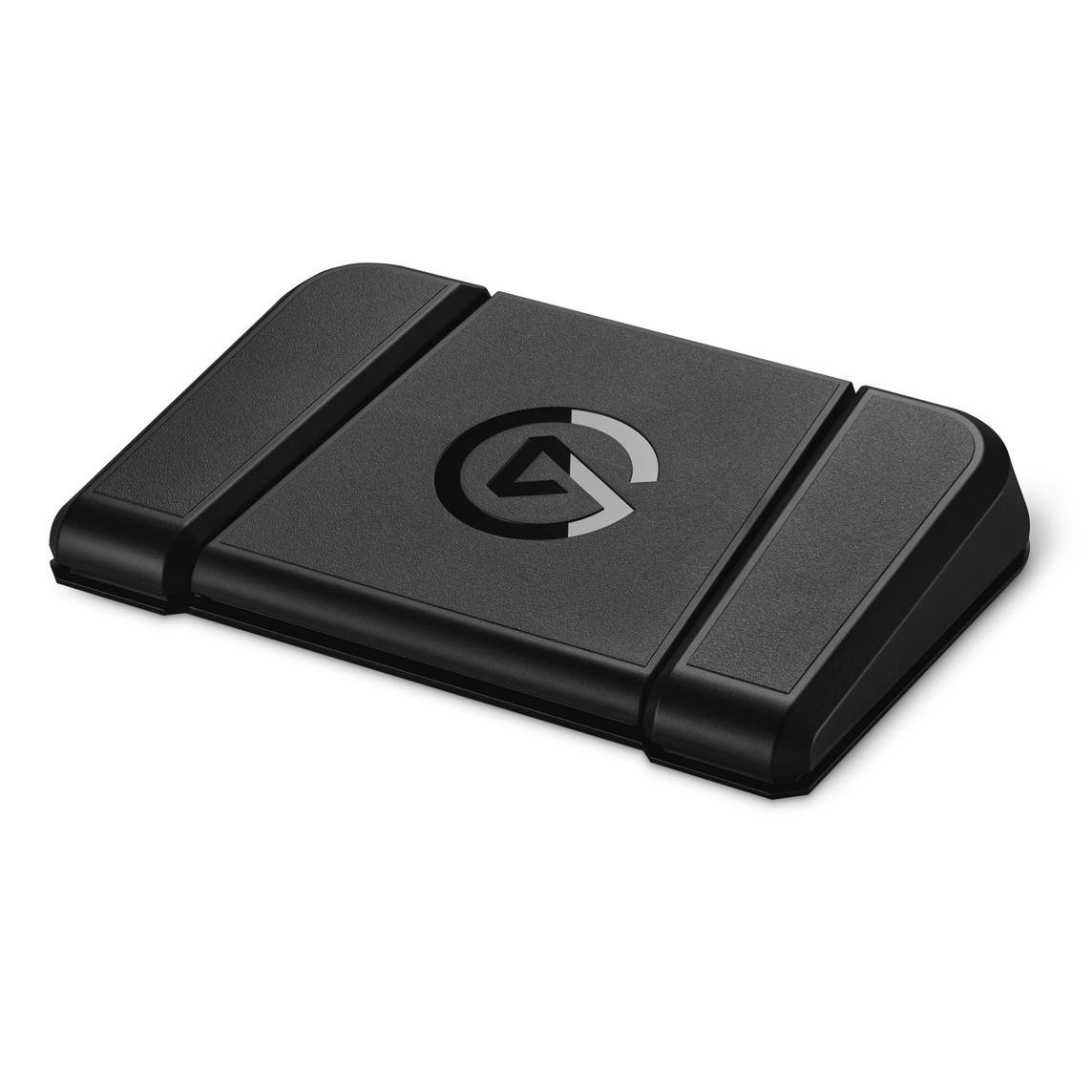
The wide black chassis is meant to disappear beneath a desk, offering control without demanding another screen or hand movement.
What You Should Know Before Buying
This is a computer controller, not an effects pedal. There is no guitar input, audio output or independent recording function. A foot press sends a command through Elgato’s Stream Deck software to a compatible application or service. You might mute a microphone, switch a streaming scene or activate a keyboard shortcut, but the connected computer performs the action. Without a supported Windows or Mac computer and the software, this is not a standalone device. Do not mistake its three switches for a conventional guitar looper, MIDI expression pedal or hardware audio controller.
Check operating-system compatibility before ordering. Elgato currently specifies Windows 11 or newer, or macOS 13 or newer, together with a USB-C connection and a free Stream Deck software download. Older setup guides mention earlier operating systems, but those historical requirements should not be treated as guarantees for the latest software. This matters if you keep a dependable but ageing studio computer offline or delay system updates for compatibility with recording applications.
Connection is wired rather than Bluetooth or Wi-Fi. The current manufacturer listing specifies a 2.5-metre USB cable, although the connector supplied can vary between documentation and retail packages, so confirm what is in your particular box. Elgato’s quick-start guidance recommends connecting directly to the computer; hubs and extension cables may cause problems. Plan a route that keeps the lead away from chair wheels and walking paths. A foot controller is convenient only when it does not introduce a new trip hazard.
The three pedals are deliberately unlabeled. There are no little LCD screens showing the action assigned to each switch. Unlike the desk-mounted Elgato Stream Deck Neo, whose illuminated keys display their functions, the Pedal expects you to remember your layout. That is manageable for three familiar commands, but less comfortable if you frequently change profiles or share the workstation with someone else. A simple diagram nearby may help.
The feel is adjustable, but not electronically expressive. Elgato includes sets of soft, medium and hard springs, plus two stoppers. Changing tension means opening the unit with a Phillips screwdriver and swapping the relevant springs; it is a physical adjustment, not a sensitivity slider in the app. The included stoppers can lock the centre pedal so it acts as a footrest. This helps tailor the resistance to your shoes or preferred pressing style, but a stronger spring does not turn a switch into a pressure-sensitive expression control. Each pedal registers an assigned action rather than a continuously variable movement.
The chassis measures approximately 244 by 175 by 49 mm and weighs 960 g. That weight, the grippy surface and anti-skid feet are designed to stop it sliding around. On a smooth hard floor they give it a firmer foundation than a featherweight switch; on deep carpet or an uneven surface, positioning still deserves attention. It is broad enough to require intentional space beneath a desk, especially around a chair base.
Useful automation takes planning. The Stream Deck application lets you drag actions onto the three pedals, build Multi Actions and use Smart Profiles that change assignments with the active program. For example, one press could launch several supported recording commands. Yet a sequence is only as reliable as its component actions, application permissions and timing. A plugin can lose functionality after a service update, and a command that works when an application is focused may behave differently when it is not. Test the complete sequence before relying on it during a live stream or an important recording.
Smart Profiles also introduce a subtle issue: when the foreground application changes, your footswitches can change meaning. That is helpful for moving between editing and meetings, but confusing if you expect a microphone mute to stay in the same place all day. Critical controls are better assigned consistently, with more adventurous shortcuts reserved for situations where accidental activation would be harmless.
Three controls still mean three immediate controls. Multiple profiles and chained actions extend the possibilities, but they do not give you a dozen pedals to find by touch. There are no rotary dials for gradual changes, and no tactile indication of a software setting’s current state beyond whatever feedback the computer provides. It is excellent for discrete commands such as start, stop, mute and scene selection, less natural for continuously riding an audio level.
Who Should Probably Avoid This Product?
If your hands are usually free at the keyboard, learn the application’s shortcuts before buying a dedicated device. For occasional video meetings, a conventional mute key may be simpler. Likewise, someone expecting to plug a guitar straight into a foot pedal and hear effects will be disappointed: this is a software shortcut controller, not part of a traditional instrument signal chain.
It also makes little sense for anyone who cannot install the supporting software, dislikes managing plugins or works mainly on tablets without a compatible desktop setup. Streamers needing many instantly visible actions may prefer a full Stream Deck with labeled keys. People who need pressure-sensitive musical performance should look specifically for equipment designed for that purpose.
Who Will Benefit Most?
The strongest use case is a creator who needs both hands in the shot. Someone filming an unboxing can change an OBS scene without reaching across the desk. A presenter using the Insta360 Link 2 4K Webcam could assign a supported camera or conferencing action to a pedal, where the relevant integration allows it. Recording musicians can map commonly used transport shortcuts in compatible software, leaving their hands on an instrument rather than the keyboard.
For podcasters, a reliable foot-operated mute or recording command can complement proper audio capture. Equipment such as the RØDE Wireless Micro handles the sound itself; Stream Deck Pedal handles supported computer-side actions. They serve different roles in a creative workspace.
A sensible first layout might be record or stop on the left, mute in the centre and change scene on the right. Build muscle memory with that arrangement before exploring complex Multi Actions. Our Audio, Computing & Entertainment guides cover other equipment for organising a more functional digital workspace.
The Elgato Stream Deck Pedal is appealing precisely because it has a narrow job. It does not improve your microphone, camera or software, and it cannot compensate for a poorly planned production. But if reaching for a keyboard repeatedly interrupts a workflow, moving three carefully chosen commands to the floor can make the process feel noticeably more fluid.
As an Amazon Associate I earn from qualifying purchases.
Opens Amazon (paid link)