Elgato Stream Deck Neo
As an Amazon Associate I earn from qualifying purchases.
Some of the most frustrating parts of working at a computer are the small, repetitive tasks. Opening the same applications, switching between programs, adjusting settings and remembering keyboard shortcuts can interrupt an otherwise productive day.
The Elgato Stream Deck Neo offers a simple way to organise these everyday actions.
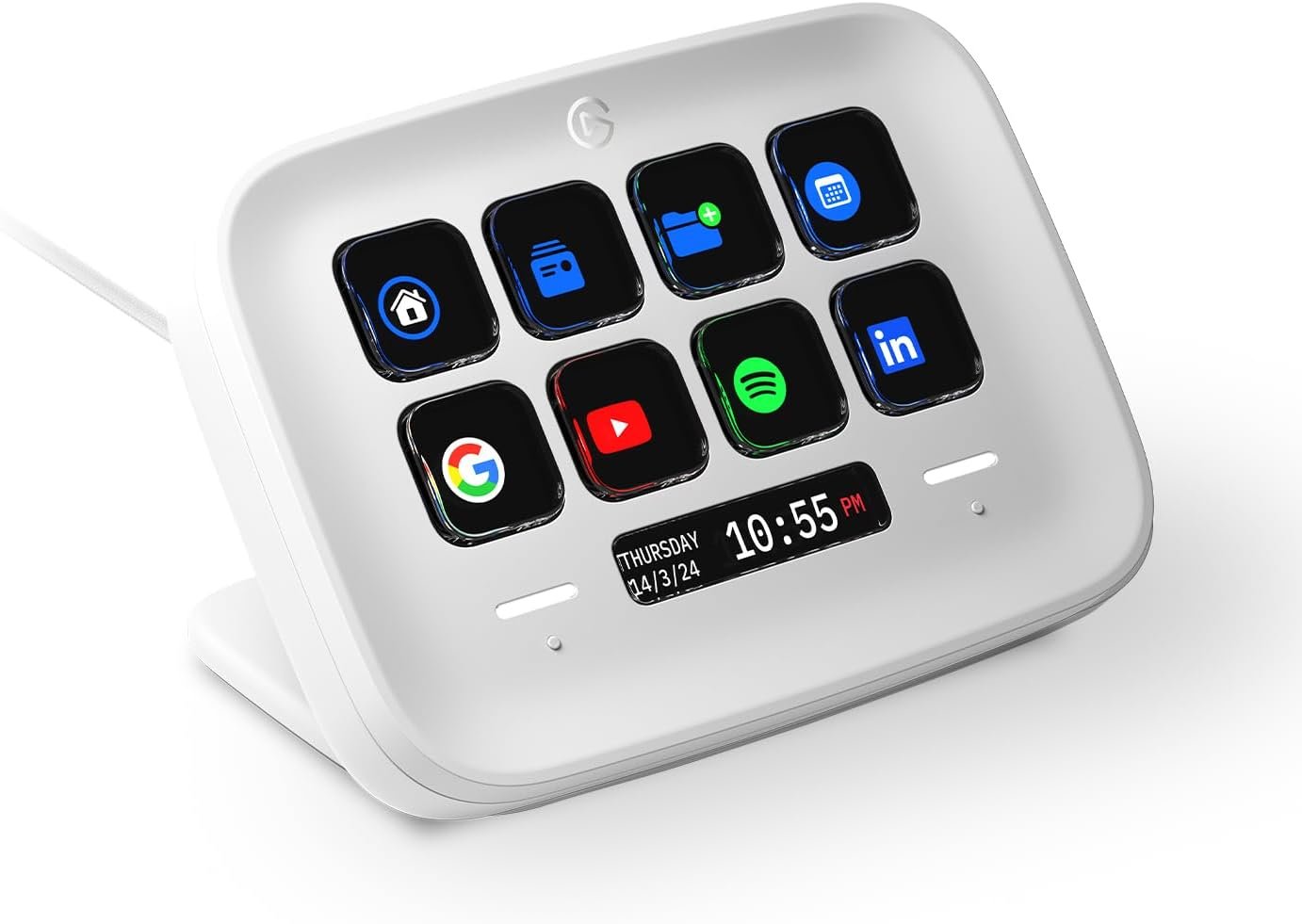
With eight customisable LCD keys, two touch-sensitive navigation points and a small information display, this compact desktop controller turns frequently used commands into clearly labelled buttons.
It isn’t just for streamers or content creators. Its real appeal is making ordinary computer work more convenient.
Why It Works on a Modern Desktop
The Stream Deck Neo has a clean white finish, rounded edges and a compact design that looks particularly comfortable alongside contemporary computer equipment.
Measuring approximately 107 mm wide, 78 mm deep and 26 mm high, it occupies relatively little desk space.
Its integrated stand supports three positions, allowing the controller to sit at different angles depending on how it is used.
At around 210 grams, it is substantial enough to be a dedicated desktop accessory without becoming cumbersome.
The eight LCD keys display their assigned functions, removing the need to remember complicated keyboard shortcuts.
That is where the Neo becomes genuinely useful. Instead of searching through menus, frequently used actions remain visible and accessible.
Eight Customisable Keys for Everyday Tasks
Each of the Neo’s eight keys can be assigned a different function through Elgato’s free Stream Deck software.
For example, one key could open an email application, another could launch a frequently visited website, and another could control a compatible meeting application.
Users can also assign keyboard shortcuts, media controls and commands supported by installed plugins.
The LCD keys display custom icons, making them easier to recognise than an ordinary keyboard shortcut.
For someone moving between several applications throughout the day, this can make the desktop feel more organised.
The physical keys use a soft-press design rather than the hard, mechanical switches found on some keyboards.
They are intended for repeated everyday use, with clearly visible labels that can be changed as requirements evolve.
Automating Several Actions at Once
One of the more useful features is Elgato’s Multi Action system.
This allows a single button to trigger a sequence of commands.
A user could create a morning-work shortcut that opens several applications or websites in a chosen order.
Another button might activate a series of compatible controls used when preparing for a video meeting.
These actions require initial configuration, but they can reduce the number of repetitive steps involved in common routines.
The possibilities depend on the software, operating system and integrations being used.
The important distinction is that the Neo isn’t simply another collection of shortcut keys. It can also coordinate supported actions into a more convenient workflow.
More Commands Without More Buttons
Eight physical keys might seem restrictive, but the Neo includes two touch-sensitive points positioned beside its information display.
These allow users to move between different pages of assigned commands.
Someone might dedicate one page to office applications, another to media controls and another to creative software.
Switching pages changes the functions displayed on the eight LCD keys.
The information display, known as the Infobar, can show details such as the time or a page label, with additional possibilities available through compatible software.
The touch points are intended for page navigation rather than operating as fully programmable shortcut buttons.
It’s a tidy arrangement that provides access to more commands while keeping the device physically compact.
Simple Software Setup
The Stream Deck Neo connects to a compatible Windows or Mac computer through USB-C.
Once the free Stream Deck application is installed, commands can be assigned using a drag-and-drop interface.
Elgato’s Marketplace provides additional plugins, profiles and icon packs, allowing users to expand the controller’s capabilities.
Application-specific profiles can also help organise different working environments.
For example, the commands useful in a video-editing application may be very different from those needed when managing emails.
The ability to change layouts makes the Neo more adaptable than a fixed-function keypad.
However, it remains dependent on compatible computer software rather than operating independently.
A Useful Addition to a Home Workspace
The Neo is most convincing when considered as part of a working computer setup.
A comfortable keyboard, suitable monitor and dependable audio equipment all contribute to making daily work easier.
For example, our Audioengine A2 HD Wireless Speakers guide explores compact speakers designed for computer desks, with modern audio connectivity.
For home offices where document printing is still necessary, our Epson EcoTank ET-2800 Printer guide covers another practical desktop technology choice.
These products perform different jobs, but they share a common purpose: making everyday computer use more convenient.
The Stream Deck Neo contributes by simplifying how users interact with their software.
The Drawbacks
The Elgato Stream Deck Neo is a clever little controller, but it won’t improve every computer setup. Its value depends heavily on how often the assigned shortcuts are used.
Only Eight Physical Keys
Eight LCD keys provide enough room for a useful collection of everyday commands, but they can feel restrictive for more demanding workflows.
Users who regularly work with dozens of shortcuts will need to organise additional pages or folders.
Although the touch points make page navigation convenient, switching layouts introduces an extra step.
Someone who wants many commands immediately visible may prefer a larger Stream Deck model.
It Requires a Connected Computer
The Neo isn’t a standalone controller.
It requires a compatible Windows or macOS computer running Elgato’s supporting software.
There is no built-in battery or wireless connection, so it cannot be carried around as an independent remote.
This makes it most suitable for a permanent desk arrangement rather than a portable setup.
The USB Cable Is Quite Short
The permanently attached USB-C cable measures approximately 90 cm.
That may be perfectly adequate for a laptop or desktop computer positioned close to the controller.
However, users with computers mounted beneath large desks may find the cable inconvenient.
A compatible extension or alternative connection arrangement could be necessary.
Because the cable is fixed, it cannot simply be replaced with a longer detachable cable.
Software Setup Takes Some Effort
The basic drag-and-drop interface is approachable, but creating a genuinely useful collection of shortcuts requires planning.
Users must decide which commands are worth assigning, install compatible integrations where necessary and organise their pages.
More elaborate automation sequences can take additional time to configure.
Some third-party plugins may also have their own requirements or limitations.
The Neo becomes more useful as the layout is refined, but that improvement isn’t entirely automatic.
Not Every Application Has the Same Support
Stream Deck works with a broad range of software, but support varies.
Some applications offer dedicated plugins with useful controls, while others rely mainly on keyboard shortcuts.
Certain integrations may require additional accounts, permissions or software.
Changes to third-party applications can also affect how particular plugins operate.
Buyers should check compatibility with the programs they actually use rather than assuming every advertised integration will suit their setup.
No Rotary Dials or Advanced Physical Controls
The Neo has eight pressable keys and two navigation touch points.
It doesn’t include the rotary controls found on the Stream Deck+.
That makes it less suitable for users who want direct tactile adjustment of audio levels, editing parameters or other continuously variable settings.
Those functions may still be controlled through supported button actions, but the experience is different from turning a physical dial.
Keyboard Shortcuts May Already Be Enough
Not everyone needs another device beside their keyboard.
Experienced computer users who already remember their most important shortcuts may find the Neo adds little convenience.
It also introduces another cable and another application running on the computer.
For someone who uses only a few programs and rarely repeats complicated tasks, the benefits could be modest.
The best reason to choose it is having enough regular, repetitive actions to justify dedicated controls.
Who It Suits Best
The Stream Deck Neo is particularly suitable for home-office workers, content creators, students and computer users who frequently switch between applications.
It makes sense for people who attend regular online meetings, manage repeated computer tasks or use creative software with numerous commands.
Its restrained white design is also appealing for smaller, carefully organised workspaces.
For more useful computer equipment and connected technology, explore our Audio, Computing & Entertainmentcollection.
Anyone who rarely uses keyboard shortcuts or prefers a completely minimal desk may find the Neo unnecessary.
Is the Elgato Stream Deck Neo Worth the Space?
The Elgato Stream Deck Neo succeeds by making everyday computer actions more accessible.
Its customisable LCD keys, page navigation and automation features offer practical benefits without demanding much desk space.
The main compromises are its limited number of physical buttons, fixed USB cable and dependence on compatible software.
For someone who regularly repeats the same digital tasks, however, the Neo offers a thoughtful way to simplify a busy desktop.
It is a small piece of technology with a clear purpose: making the computer easier to work with, one useful shortcut at a time.
As an Amazon Associate I earn from qualifying purchases.