Insta360 Link 2 4K Webcam
As an Amazon Associate I earn from qualifying purchases.
The Insta360 Link 2 4K Webcam brings a more intelligent approach to video calls, online meetings and content creation. Rather than simply recording whatever happens in front of a computer, it uses a motorised camera, AI tracking and intelligent image processing to make video communication more flexible.
For anyone who spends time working from home, teaching online or creating video content, the difference between an ordinary webcam and one that can follow movement is worth considering.
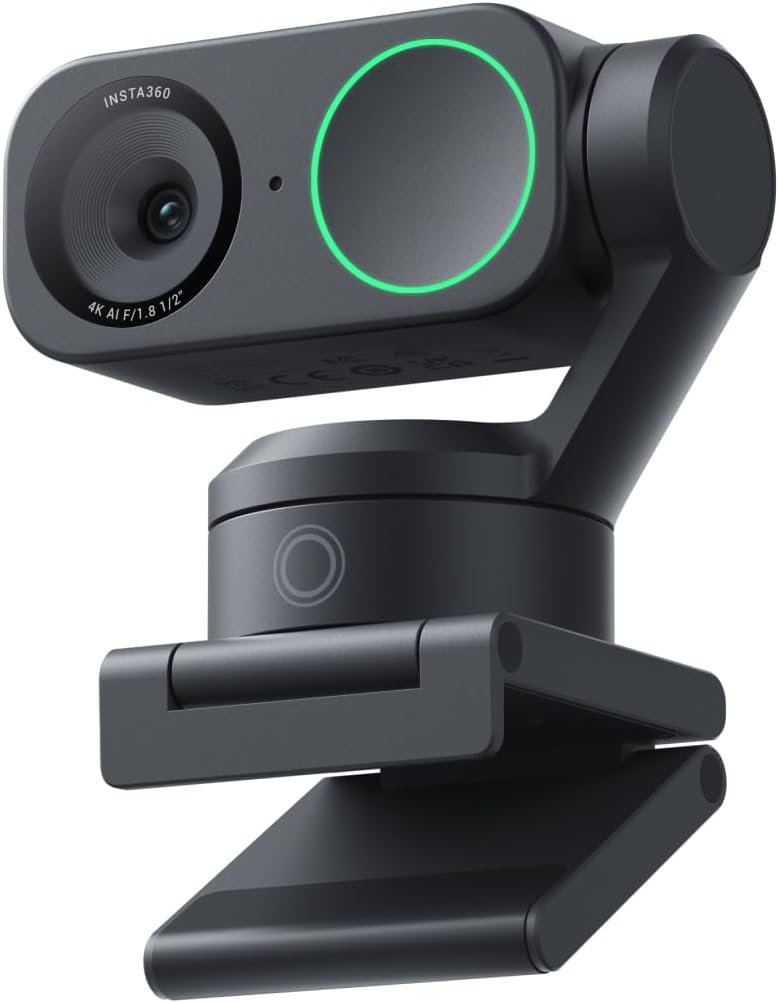
The Link 2 combines a 4K camera, a 1/2-inch image sensor, phase-detection autofocus and AI-powered audio processing in a compact desktop device.
Its most interesting feature, however, is its ability to respond to what is happening in front of the lens.
Why It Works in a Modern Home Office
Most conventional webcams remain fixed in one position. Once the camera is correctly angled, the person using it must stay within that frame.
The Insta360 Link 2 approaches video communication differently.
Its two-axis gimbal allows the camera to pan and tilt, following a person as they move around a suitable space.
This makes it particularly useful for online presentations, demonstrations and meetings where remaining perfectly still is inconvenient.
Someone explaining a product, teaching a lesson or demonstrating something beside their desk can move more naturally without continually repositioning the camera.
For ordinary seated meetings, the advantage is less dramatic but still useful. Intelligent framing can help keep the person correctly positioned without constant manual adjustment.
The camera also has a restrained, contemporary appearance. Its compact black housing avoids the bulky design of traditional video equipment, making it suitable for a permanent position above a computer monitor.
The result is a webcam that offers more freedom without requiring the elaborate setup associated with dedicated video-production equipment.
4K Video With Intelligent Image Processing
The Link 2 records at resolutions up to 4K at 30 frames per second.
Its 1/2-inch sensor is relatively generous for a webcam and is designed to capture useful detail in varied lighting conditions.
This matters in home offices, where lighting is rarely as consistent as it would be in a professional studio.
A desk positioned near a window, for example, may experience strong daylight in the morning and considerably softer illumination later in the day.
The camera’s HDR processing helps manage differences between bright and dark areas of the image.
Phase-detection autofocus also allows the camera to adjust focus when the distance between the subject and lens changes.
That becomes valuable when someone leans forward to show an object or moves further away from the desk.
For situations where smoother movement is more important than maximum resolution, the Link 2 also supports 1080p recording at up to 60 frames per second.
It is worth remembering that individual conferencing applications may restrict the video resolution they transmit. Owning a 4K camera does not guarantee that every online meeting will be displayed in 4K.
AI Tracking That Follows Your Movement
The Link 2’s motorised tracking system is what separates it from many ordinary webcams.
When AI tracking is enabled, the camera can identify a person and adjust its position to follow their movement.
The Insta360 Link Controller software provides options for adjusting tracking behaviour, framing and movement speed.
There are single-person and group-tracking modes, offering flexibility for different situations.
For example, someone delivering an online presentation might want the camera to follow them as they stand beside a desk.
A small group participating in a video meeting may prefer a wider composition that keeps everyone visible.
The system can also use intelligent zoom adjustments to help maintain suitable framing.
This doesn’t turn the Link 2 into a fully automated video-production camera, but it can reduce the amount of manual attention needed during a presentation.
For anyone regularly creating tutorials, recording educational material or demonstrating equipment, that freedom is particularly appealing.
DeskView, Whiteboard and Gesture Controls
The Insta360 Link 2 offers several specialised modes beyond conventional video calling.
DeskView allows the camera to tilt downwards and capture objects positioned on a desk.
This is useful for demonstrating small products, explaining drawings or showing practical work without setting up a second camera.
Whiteboard Mode provides another presentation option, helping make writing and diagrams on a whiteboard easier for viewers to see.
The software can adjust the presentation of the whiteboard area, making it more suitable for online lessons and collaborative discussions.
Gesture controls introduce an additional layer of convenience.
Recognised hand gestures can activate certain functions, including tracking and zoom controls.
This means a presenter can make selected adjustments while standing away from the keyboard.
It is a thoughtful arrangement for people who need to concentrate on explaining something rather than managing camera settings.
Built-In Audio With AI Noise Reduction
Video quality is only part of a successful online meeting.
Poor audio can make even a clear picture frustrating to watch, particularly when background sounds interfere with conversation.
The Link 2 includes a built-in microphone system with AI noise-cancelling technology.
Its audio processing is designed to reduce unwanted environmental noise while keeping speech understandable.
Insta360 also provides different audio modes, including options that prioritise the speaker’s voice or balance speech with background music.
This gives the camera greater flexibility than a webcam with an entirely basic microphone arrangement.
For everyday meetings, the built-in audio may provide a convenient alternative to keeping another microphone on the desk.
However, anyone producing professional voice recordings, podcasts or music content may still prefer a dedicated microphone positioned closer to the speaker.
The Link 2 is designed to make communication more convenient, not eliminate every reason for using specialised audio equipment.
What It Feels Like to Use
The Link 2 has a compact, purposeful design with a motorised camera head mounted above its supporting base.
Its dark finish and relatively small dimensions help it blend into a computer setup without becoming the centre of attention.
The camera weighs approximately 102 grams without its magnetic mount, giving it a lightweight physical specification.
An included magnetic mounting arrangement allows it to be positioned on a suitable monitor, while a standard quarter-inch mounting point offers compatibility with appropriate tripod accessories.
It connects through USB, and the accompanying Insta360 Link Controller software provides access to more advanced settings.
The experience is quite different from a basic fixed webcam.
Instead of continually checking whether you are sitting in the correct position, you can allow the tracking system to manage some of the framing.
That can make demonstrations and longer presentations feel less restrictive.
For people building a productive desktop setup, our Elgato Stream Deck Neo guide explores another useful way to simplify frequently repeated computer tasks.
The Link 2 can also form part of a carefully organised workspace alongside equipment such as the Anker Prime 250W Charging Station, which helps manage power for several compatible devices.
For users who also want compact desktop audio, our Audioengine A2 HD Wireless Speakers guide looks at a different aspect of improving the computer experience.
Together, these products illustrate how individual pieces of technology can make a home-office environment more comfortable and practical.
The Drawbacks
The Insta360 Link 2 has several appealing features, but it also introduces compromises that buyers should consider before choosing it over a conventional webcam.
More Technology Than Everyone Needs
The biggest question is whether its advanced features will actually be used.
Someone who spends most of their video calls sitting directly in front of a laptop may gain relatively little from motorised tracking.
A good fixed webcam can already provide clear video for ordinary meetings.
The Link 2 becomes more interesting when the camera needs to accommodate movement, presentations or demonstrations.
If those situations rarely arise, much of its additional technology may remain unused.
4K Recording Is Limited to 30fps
Although the Link 2 supports 4K recording, its maximum frame rate at that resolution is 30fps.
Users wanting 60fps must select a lower resolution, such as 1080p.
For ordinary video meetings this is unlikely to be a significant problem.
However, people creating fast-moving content or wanting exceptionally smooth recordings may prefer equipment with different video capabilities.
It is also important to recognise that video conferencing services may compress footage or impose their own resolution limits.
A high-resolution webcam cannot overcome every limitation of the software receiving its video.
Advanced Features Depend on Software
The Link 2 can function as a standard webcam without using every available software feature.
However, the more sophisticated controls depend on the Insta360 Link Controller application.
This adds another piece of software to install, configure and maintain.
The system is designed primarily around compatible Windows and macOS computers.
Some advanced functions also have stricter hardware and operating-system requirements.
Features such as Natural Bokeh and virtual backgrounds may not be available on every computer, even when the basic webcam operates normally.
Anyone purchasing the Link 2 for one particular software feature should check the current compatibility requirements first.
AI Tracking Has Practical Limits
Motorised tracking is useful, but it cannot guarantee perfect framing in every situation.
The camera needs to recognise a suitable subject, and performance may depend on positioning, visibility and movement.
Walking outside the camera’s practical tracking area can interrupt the process.
Tracking is designed primarily for people rather than pets or arbitrary moving objects.
This distinction matters for anyone hoping to use the camera to follow products moving across a workbench.
The Link 2 is primarily an intelligent video-communication camera, not a general-purpose object-tracking system.
Gesture Recognition Isn’t Always Ideal
Gesture control sounds convenient, particularly when standing away from the computer.
However, successful recognition depends on the camera being able to see the appropriate gesture clearly.
Insta360 advises users to keep their faces visible when activating tracking through a hand gesture.
Unusual lighting, hand positioning or interruptions to the camera’s view may make manual controls more convenient.
For an important presentation, becoming familiar with the gestures beforehand would be sensible.
The feature is best regarded as an additional control method rather than a complete replacement for the software interface.
A Built-In Microphone Has Limitations
AI noise reduction is useful for reducing distractions during spoken communication.
Nevertheless, software processing cannot guarantee perfect audio in every environment.
A room with significant echo, several people speaking simultaneously or loud nearby machinery may still produce unsatisfactory sound.
Aggressive noise reduction can also affect the natural character of speech or background audio.
Anyone recording music, detailed voiceovers or professional interviews should consider whether a dedicated microphone would provide more consistent results.
Good microphone positioning and sensible room acoustics remain important.
Privacy Relies on a Motorised Mechanism
The Link 2 offers a privacy mode that turns the camera lens downwards when it is inactive.
This provides a visible indication that the lens is no longer facing the room.
However, the Link 2 does not use the same manually operated sliding privacy cover found on the Link 2C.
Some people prefer the certainty of a physical shutter that they close themselves.
The automatic system is convenient, but buyers who specifically want a mechanical lens cover should understand the difference between the two models.
DeskView Has Positioning Requirements
DeskView is a useful idea, but the camera’s position still affects what it can capture.
A monitor-mounted webcam sits at a particular height and angle relative to the work surface.
Large monitors, deep desks or awkward mounting positions may make it harder to achieve the desired overhead perspective.
For frequent close-up demonstrations, a dedicated overhead camera arm may offer greater flexibility.
The Link 2 is convenient for occasional desk presentations, but it should not automatically be regarded as a substitute for a specialised filming arrangement.
The Motorised Design Adds Complexity
A conventional webcam has relatively few moving components.
The Link 2’s gimbal introduces a mechanical system that must operate correctly for tracking and positioning.
Although this allows more sophisticated movement, it also makes the camera less straightforward than a fixed model.
Users should avoid forcing the motorised head or placing the device where it could be knocked repeatedly.
Careful handling matters, especially when moving equipment between different workspaces.
It Still Needs Suitable Lighting
The relatively large sensor and image processing can improve performance in less-than-ideal conditions.
However, no webcam can create excellent lighting where very little usable light exists.
Strong backlighting, dark rooms and uneven illumination can still affect image quality.
A modest desk lamp or carefully positioned light may make a bigger practical difference than simply selecting the highest recording resolution.
For anyone planning regular video recording, lighting should be considered part of the setup rather than an optional extra.
Who It Suits Best
The Insta360 Link 2 makes particular sense for people who regularly work through video.
Home-office professionals, online teachers, content creators and people delivering remote presentations are obvious candidates.
Its motorised tracking system is especially useful when someone needs to move away from the computer while remaining visible.
DeskView and Whiteboard Mode add further possibilities for demonstrations and instructional material.
The camera could also appeal to small businesses wanting more flexible video communication without setting up a complicated production system.
Those who simply need occasional video calls may be better served by a more conventional webcam.
For more ideas on creating a practical computer and entertainment setup, explore our Audio, Computing & Entertainment guides.
Ultimately, the Link 2 is most suitable for someone who can make regular use of its intelligent framing rather than treating 4K resolution as the only reason to buy it.
Is the Insta360 Link 2 Worth the Desk Space?
The Insta360 Link 2 combines high-resolution video, intelligent tracking and useful presentation features in a compact desktop camera.
Its ability to follow movement is the most distinctive feature, particularly for people who teach, demonstrate products or create video content from home.
The 4K sensor, autofocus and intelligent audio processing add practical benefits, while DeskView and gesture controls make the camera more versatile.
There are compromises. The advanced functionality introduces software requirements, 4K recording is limited to 30fps, and motorised tracking will not benefit everyone.
For someone who spends most of their time sitting still during occasional video calls, a simpler webcam may be sufficient.
However, for regular presenters and creators who want greater freedom to move naturally, the Insta360 Link 2 offers a thoughtful alternative to fixed-camera designs.
Its strongest quality is not simply producing a sharper picture. It is making the camera less of a distraction and allowing the person in front of it to concentrate on what they are doing.
As an Amazon Associate I earn from qualifying purchases.