
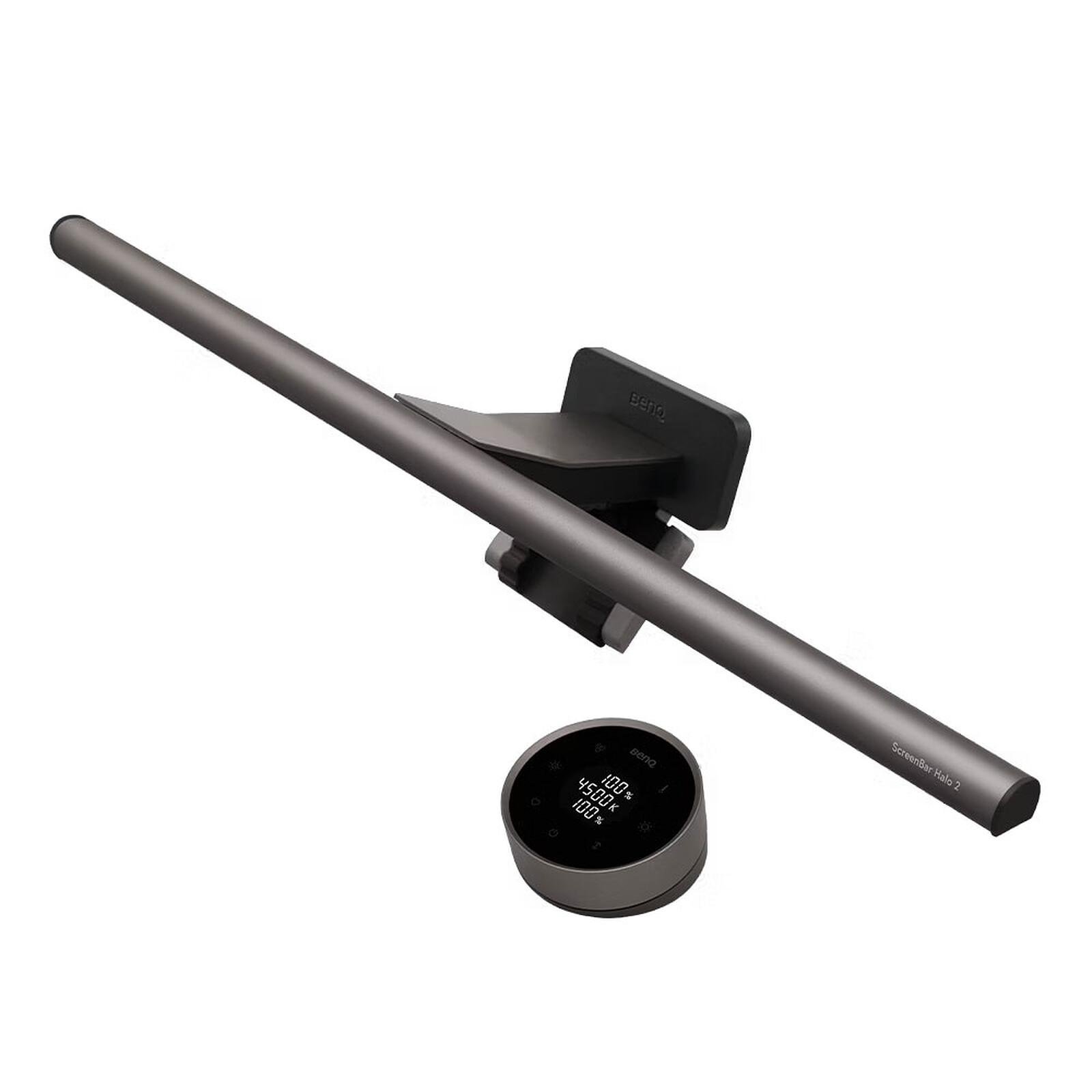
BenQ ScreenBar Halo 2 Monitor Light
As an Amazon Associate I earn from qualifying purchases.
A comfortable workspace involves more than a good monitor and a tidy desk. Lighting plays an important role, particularly when working early in the morning, late in the evening or in rooms where natural daylight changes throughout the day.
The BenQ ScreenBar Halo 2 Monitor Light offers a carefully considered approach to desktop illumination.
Instead of occupying valuable desk space like a traditional lamp, it sits above the monitor, directing light towards the working area while providing soft illumination behind the screen.
With adjustable brightness, colour temperature, intelligent light sensing and a rechargeable wireless controller, the Halo 2 combines practical technology with a restrained, contemporary design.
A More Thoughtful Way to Light Your Desk
Conventional desk lamps often create a compromise between useful illumination and available workspace.
A large lamp base occupies valuable room, while an adjustable arm may interfere with monitors, speakers or other equipment.
The BenQ ScreenBar Halo 2 takes a different approach.
Its slim aluminium-alloy housing sits above the monitor, leaving the desk surface available for keyboards, documents and everyday accessories.
The dark-grey finish has an understated appearance that works particularly well with modern computer equipment.
Rather than becoming the centre of attention, the light bar integrates neatly into the overall workspace.
This makes it especially appealing for home offices, creative workstations and desks where space is carefully organised.
Its adjustable lamp head directs light downwards towards the working area rather than straight towards the screen.
BenQ’s asymmetrical optical design is intended to illuminate the desktop while minimising distracting reflections on the monitor.
For anyone who regularly works with documents, notebooks or other materials beside a computer, that arrangement can be particularly convenient.
Front Lighting and Rear Illumination Working Together
One of the most attractive features of the ScreenBar Halo 2 is its combination of front and rear lighting.
The front light illuminates the desk surface, helping users see keyboards, paperwork and other equipment clearly.
Behind the monitor, an additional lighting system creates a softer pool of illumination against the surrounding wall.
This rear lighting can help reduce the strong visual contrast between a bright monitor and a dark room.
It also produces an attractive ambient effect, particularly when the computer is positioned against a plain wall.
Instead of a single bright source of light, the workspace benefits from a more balanced arrangement.
The Halo 2 allows the front and rear lights to operate independently or together.
That flexibility makes it suitable for different activities, from focused daytime work to relaxed evening computer use.
For a desk containing several useful accessories, our Elgato Stream Deck Neo article explores another compact device designed to make the computer experience more convenient.
The BenQ takes a complementary approach, improving the physical working environment rather than controlling software.
Adjustable Lighting for Different Activities
Lighting preferences vary considerably.
Some people prefer cooler, brighter illumination when reading documents or concentrating on detailed work.
Others find warmer lighting more comfortable when relaxing at their computers in the evening.
The ScreenBar Halo 2 provides an adjustable colour-temperature range of 2700K to 6500K.
This allows users to move between warmer and cooler white light according to their preferences and surroundings.
Brightness can also be adjusted to suit the task.
BenQ specifies a lighting coverage of approximately 85 × 50cm at 500 lux, providing useful illumination across a substantial working area under its stated test conditions.
The front light also has a colour rendering index of Ra 95 or higher.
This indicates that the lighting is designed to reproduce colours accurately, a useful consideration when examining printed materials, illustrations or physical objects at the desk.
These controls allow users to create a lighting arrangement that feels appropriate for their own workspace rather than relying on one fixed setting.
A Wireless Controller That Keeps Things Simple
The Halo 2 includes a rechargeable wireless desktop controller.
Its circular design gives it a more refined appearance than a conventional remote control, while keeping lighting adjustments within easy reach.
The controller provides access to brightness, colour-temperature settings and lighting modes without requiring the user to reach above the monitor.
The front and rear lighting can be adjusted independently, providing additional flexibility.
A small illuminated display helps communicate the selected settings.
BenQ specifies approximately three months of standby battery life under suitable conditions, with recharging available through USB-C.
For users who frequently change lighting during the day, the wireless controller is an especially convenient feature.
It also complements a workspace where power connections and cables are carefully organised.
Our Anker Prime 250W Charging Station guide explores another approach to keeping several electronic devices powered from one tidy desktop location.
Intelligent Lighting That Responds to Your Workspace
The BenQ ScreenBar Halo 2 includes automatic brightness adjustment and presence detection.
Its light sensor can adjust illumination in response to the surrounding environment, helping maintain a suitable level of desktop brightness as conditions change.
An ultrasonic motion sensor provides automatic operation when someone approaches or leaves the workspace.
This can be useful for people who regularly step away from their computers during the day.
Instead of remembering to adjust the light manually every time they return, the system can respond to movement within its detection area.
The Halo 2 also incorporates a monitor mounting system intended to accommodate many flat and curved screens.
BenQ specifies support for monitor thicknesses between 0.43cm and 6cm, with additional compatibility requirements for curved designs.
For a compatible monitor, the result is a tidy installation that avoids adding another freestanding accessory to the desk.
The Drawbacks
The BenQ ScreenBar Halo 2 offers a sophisticated lighting arrangement, but its additional technology and specialist design will not suit every computer setup.
A Premium Lighting Solution
The first consideration is whether its advanced features justify choosing it over a conventional desk lamp.
Many people already have adequate room lighting or a basic adjustable lamp that provides sufficient illumination.
The Halo 2 offers additional convenience through its wireless controller, rear lighting and automatic operation.
However, those features will be less valuable to someone who rarely works in changing lighting conditions.
The strongest reason to choose this model is wanting a carefully controlled desktop lighting arrangement rather than simply adding more light.
Monitor Compatibility Must Be Checked
Although the mounting mechanism accommodates many displays, it is not universally compatible.
BenQ specifies particular requirements for monitor thickness and curvature.
Certain unusual monitor housings, very thin designs, heavily curved displays and screens with large rear protrusions may require additional consideration.
A monitor-mounted webcam can also complicate positioning.
The Halo 2 includes a webcam mounting accessory, but buyers should still confirm that their particular camera and monitor arrangement will work together.
The light bar should not be purchased on the assumption that every monitor will support it equally well.
The Motion Sensor Has Limitations
Automatic presence detection sounds convenient, but its operation depends on movement within the sensor’s intended detection area.
BenQ explains that the sensor can switch the light off after approximately five minutes when significant movement is not detected.
This means someone sitting very still while reading or watching a video may occasionally experience an unwanted interruption.
Environmental interference can also influence sensor behaviour.
Users who prefer completely predictable lighting may find manual operation more suitable than relying on automatic presence detection.
Rear Lighting Depends on the Surroundings
The rear illumination is most effective when there is a suitable surface behind the monitor.
A screen positioned reasonably close to a plain wall can produce an attractive, diffused lighting effect.
However, a monitor standing in the middle of a room, beside a window or against an unusually coloured surface may produce a different result.
The final appearance will depend partly on the surroundings rather than the light bar alone.
Anyone buying the Halo 2 primarily for its rear lighting should consider their actual desk arrangement.
It Requires an Appropriate Power Supply
The light uses USB-C power, with BenQ specifying a 5V, 3A supply and maximum consumption of 15 watts.
That means an unsuitable low-power USB port may not provide reliable operation.
Users should follow the manufacturer’s power requirements instead of assuming every available USB connection will be sufficient.
The cable also needs to be routed from the monitor to a suitable power source.
Although the light removes the need for a conventional lamp base, it does not eliminate wiring completely.
The Controller Needs Occasional Charging
The wireless controller helps keep lighting adjustments convenient, but it introduces another rechargeable component.
Its battery will eventually need replenishing through USB-C.
The controller also enters a sleep state to conserve energy, so users may need to wake it before adjusting settings.
These are relatively small inconveniences, but they are worth understanding if the goal is to create an extremely simple workspace.
A conventional wired lamp with a physical switch avoids that additional consideration.
It Cannot Replace Every Type of Room Lighting
The ScreenBar Halo 2 is designed primarily to illuminate a computer workspace.
Its concentrated front lighting and soft rear illumination serve a different purpose from a ceiling light or a larger room lamp.
It should not be expected to illuminate an entire office evenly.
Similarly, people working on very large desks may find that some areas remain outside the light’s intended coverage.
Additional lighting may still be necessary for larger work surfaces or activities taking place away from the monitor.
Better Lighting Does Not Solve Every Comfort Problem
Appropriate desktop illumination can help create a more comfortable viewing environment, but it cannot eliminate every cause of eye discomfort.
Screen brightness, viewing distance, reflections, posture and prolonged periods without breaks can all affect the computer experience.
A monitor light is one part of a thoughtfully arranged workspace rather than a complete solution to visual fatigue.
Users experiencing persistent eye discomfort should consider broader ergonomic and vision-related factors.
These limitations do not detract from the Halo 2’s design. They simply clarify that it is a specialist desktop lighting accessory whose value depends on the environment in which it will be used.
Who Will Appreciate the BenQ ScreenBar Halo 2?
The Halo 2 is particularly appealing to people who spend substantial periods working at a desktop computer.
Home-office workers may appreciate having adjustable task lighting that leaves valuable desk space available.
Designers, writers and students can benefit from convenient illumination for documents, keyboards and other materials surrounding their monitors.
Its rear lighting may also appeal to people who enjoy a carefully styled workstation with a softer atmosphere during evening use.
Computer enthusiasts who appreciate intelligent accessories and precise control are another natural audience.
For those building a complete workspace, our Insta360 Link 2 4K Webcam guide explores another technology designed to improve the experience of working and communicating from a desk.
The BenQ is best suited to someone who values lighting quality, thoughtful controls and a neat installation rather than simply wanting the most basic available desk lamp.
Explore our Audio, Computing & Entertainment guides for more carefully selected technology that can improve everyday computer use.
Is the BenQ ScreenBar Halo 2 Worth Buying?
The BenQ ScreenBar Halo 2 combines intelligent lighting features with a refined, practical design.
Its greatest attraction is the way it brings several lighting functions into one monitor-mounted accessory without occupying additional desk space.
The adjustable front illumination, soft rear lighting, wireless controller and automatic brightness features make it particularly appealing for modern home offices.
There are limitations, particularly around monitor compatibility, power requirements and the behaviour of the automatic sensor.
Nevertheless, for someone who regularly works at a computer and appreciates carefully considered equipment, the ScreenBar Halo 2 offers a compelling way to create a more organised and comfortable workspace.
It is a product designed not simply to brighten a desk, but to make the surrounding working environment feel more thoughtfully arranged.
As an Amazon Associate I earn from qualifying purchases.