
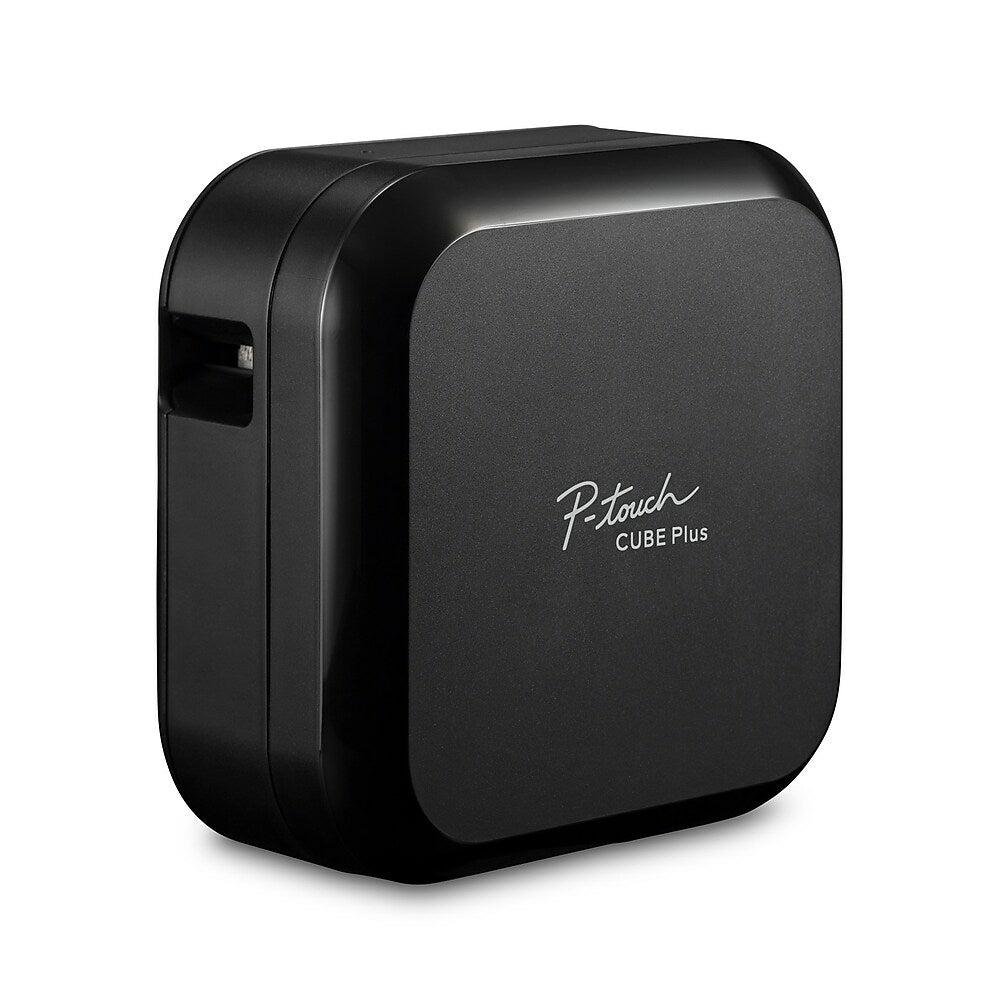
Brother P-touch CUBE Plus
As an Amazon Associate I earn from qualifying purchases.
There’s something satisfying about opening a cupboard, drawer or storage box and knowing exactly what’s inside. The Brother P-touch CUBE Plus makes that kind of organisation easier, turning an ordinary smartphone or computer into a surprisingly versatile label-making system.
With its compact black housing, Bluetooth connectivity and rechargeable battery, this little printer is designed for far more than office filing.
Think labelled charging cables, pantry containers, workshop drawers, craft supplies and home-office equipment.
But before buying, it’s worth understanding the software requirements, compatible tapes and ongoing running costs.
A Different Approach to Label Making
The Brother P-touch CUBE Plus PT-P710BT doesn’t have a traditional keyboard or built-in display.
Instead, you create labels using compatible software on a smartphone, tablet or computer.
Bluetooth allows printing from supported mobile devices, while a USB connection provides computer connectivity.
This opens up possibilities beyond simply typing a few words. Depending on the software, labels can incorporate different fonts, symbols, decorative frames, barcodes and more sophisticated layouts.
Brother supports laminated TZe tapes up to 24 mm wide, giving users a choice of label sizes and finishes.
The printer also includes an automatic cutter, eliminating the need to trim every printed label with scissors.
It’s a tidy approach to a familiar household task.
Small Printer, Plenty of Possibilities
The CUBE Plus measures approximately 128 × 67 × 128 mm.
Its simple black design is intended to sit comfortably on a desk or shelf without occupying much room.
Unlike larger desktop printers, it doesn’t require a permanent area dedicated to printing documents.
The integrated lithium-ion battery makes it portable around the house, while USB charging eliminates the need to keep buying disposable batteries.
Imagine labelling cables behind a computer, organising power adapters or identifying accessories in a drawer.
It could complement a workspace using equipment such as the Anker Prime 250W Charging Station .
Both products approach desktop organisation differently, with one managing charging connections and the other helping identify equipment.
What You Should Know Before Buying
The Brother P-touch CUBE Plus has several attractive features, but the details below are particularly important if you’re expecting a simple, inexpensive label printer.
It Cannot Operate Entirely on Its Own
This is the first thing buyers should understand.
The CUBE Plus has no built-in keyboard or screen for creating labels independently.
You’ll need a compatible smartphone, tablet or computer and appropriate Brother software.
For someone comfortable using mobile applications, this may be an advantage.
However, people who prefer pressing physical buttons and printing immediately may find the process unnecessarily complicated.
Check current software compatibility with your operating system before purchasing, particularly if you’re using an older computer or mobile device.
Bluetooth Doesn’t Mean Wi-Fi Printing
Bluetooth connectivity makes mobile label creation convenient, but it shouldn’t be confused with a network printer.
The CUBE Plus isn’t designed as a standalone Wi-Fi printing device accessible throughout the home.
The phone or tablet must communicate through its supported Bluetooth connection.
Computer printing uses USB.
If you want a printer shared over a household network without a direct connection, this may not be the appropriate model.
Replacement Tape Is an Ongoing Expense
Brother’s TZe tape system is central to the CUBE Plus experience.
The compatible laminated tapes are available in different widths and finishes, but they are consumables that must eventually be replaced.
Brother’s US product information lists starter tape with the printer, although the exact included tape assortment should be checked against the selected retail package.
Once that tape is exhausted, additional cassettes are needed.
Frequent labelling, decorative designs and long labels can use material surprisingly quickly.
Before purchasing, consider how many labels you’ll realistically print and investigate the availability of the tape types you prefer.
Not Every Tape Cassette Is Compatible
The printer supports the Brother TZe tape family.
It isn’t a general-purpose thermal label printer designed for arbitrary paper rolls, shipping-label media or unrelated cartridge systems.
Supported widths include 3.5, 6, 9, 12, 18 and 24 mm, depending on the relevant product specifications.
The maximum printable width is smaller than the full tape width, so a 24 mm cassette doesn’t provide 24 mm of uninterrupted printed content.
If you’re planning labels for unusually narrow cables or large storage containers, check the finished label dimensions carefully.
Tape Waste Can Be Frustrating
One of the less appealing aspects of cartridge-based label printers is unused tape.
Depending on the label design, settings and printing process, blank margins or leading sections may be produced.
The automatic cutter makes the result neat, but it doesn’t guarantee that every millimetre of tape will be used.
This matters when printing many short labels.
Users may wish to explore continuous or multiple-label printing options in the software where supported.
Small amounts of waste might seem insignificant initially, but they can become annoying as more cassettes are consumed.
It Doesn’t Print Ordinary Documents
Despite being called a printer, the CUBE Plus is specifically designed for labels.
Its maximum supported tape width is 24 mm, making it unsuitable for printing letters, photographs, invoices or standard shipping documents.
The device uses thermal-transfer technology rather than conventional inkjet printing.
It doesn’t require ordinary ink cartridges, but it does require appropriate label tape.
For full-size documents or shipping labels, a different printer is necessary.
Software Is Part of the Ownership Experience
Brother provides mobile and desktop applications for designing labels.
These offer useful formatting options, but they introduce another layer of setup.
Installing software, pairing the printer and learning its editing tools are all part of getting started.
The available features can vary between mobile and desktop applications.
Anyone purchasing the device specifically for QR codes, barcodes or particular graphic layouts should confirm that the required feature is supported by their intended software.
Don’t assume every design option is identical across platforms.
The Battery Needs Charging
The built-in rechargeable battery is convenient because the printer can be moved around without remaining plugged into mains power.
However, it still needs periodic charging.
Brother’s documentation identifies USB charging and a built-in lithium-ion battery.
Battery performance will depend on usage and age, and the battery won’t retain its original capacity indefinitely.
The standard PT-P710BT uses a Micro-USB connection, which may be less convenient for households that have moved entirely to USB-C equipment.
A compatible USB cable is included, but a separate wall power adapter may not be.
Labels Won’t Suit Every Surface
Brother’s laminated TZe tapes are designed for durability, with resistance characteristics varying according to the selected tape.
However, adhesion depends on the surface and environment.
Rough, dusty, oily, curved or heavily textured surfaces can be more challenging than clean, smooth ones.
Some specialised applications may require particular adhesive tapes.
For example, labelling cables or flexible objects may call for a different cassette type from ordinary flat-surface labelling.
Always select tape appropriate to the intended material and conditions.
It’s Not an Industrial Labelling System
The CUBE Plus is a versatile household and office device, but it shouldn’t automatically replace specialist industrial identification equipment.
Professional electrical installations, safety markings and regulated environments may require specific labels or equipment.
The ability to print a label doesn’t guarantee its suitability for every application.
Choose materials and printing systems that meet the actual requirements of the job.
Who Should Probably Avoid This Product?
People wanting a self-contained handheld label maker may prefer a model with its own keyboard and display.
High-volume shipping businesses should consider dedicated shipping-label printers.
Buyers concerned about ongoing consumable costs need to account for replacement TZe cassettes.
Anyone needing Wi-Fi network printing should look for a printer specifically supporting that feature.
Users with older or unsupported devices should check software compatibility before committing.
And those who print only an occasional label may find that the CUBE Plus offers more capability than they actually need.
Who Will Benefit Most?
The CUBE Plus is particularly appealing to people who enjoy organising their homes, workspaces and equipment.
Home-office users can label cables, chargers, storage boxes and stationery.
Content creators might use it to identify equipment cases, memory-card storage and recording accessories alongside products such as the Insta360 Link 2 4K Webcam .
For people improving their desks, labelled drawers and accessories can also complement a setup featuring the BenQ ScreenBar Halo 2 Monitor Light .
Households with busy cupboards, hobby supplies or frequently used storage containers may find plenty of everyday applications.
Explore our Audio, Computing & Entertainment guides for more technology that helps make a workspace practical and organised.
The best reason to choose this printer is having several genuine uses for it, rather than simply enjoying the novelty of making labels.
Small Details, Better Organisation
The Brother P-touch CUBE Plus combines a compact appearance with flexible label creation, Bluetooth connectivity and useful rechargeable portability.
Its greatest strength is helping people organise everyday belongings without requiring a bulky desktop machine.
The compromises are important: it depends on external software, replacement tape adds ongoing expense, and certain applications require careful cassette selection.
For households and workspaces that regularly need labels, however, the CUBE Plus offers a thoughtful way to bring order to cables, containers, equipment and all those small things that somehow end up in the wrong drawer.
As an Amazon Associate I earn from qualifying purchases.
Opens Amazon (paid link)