
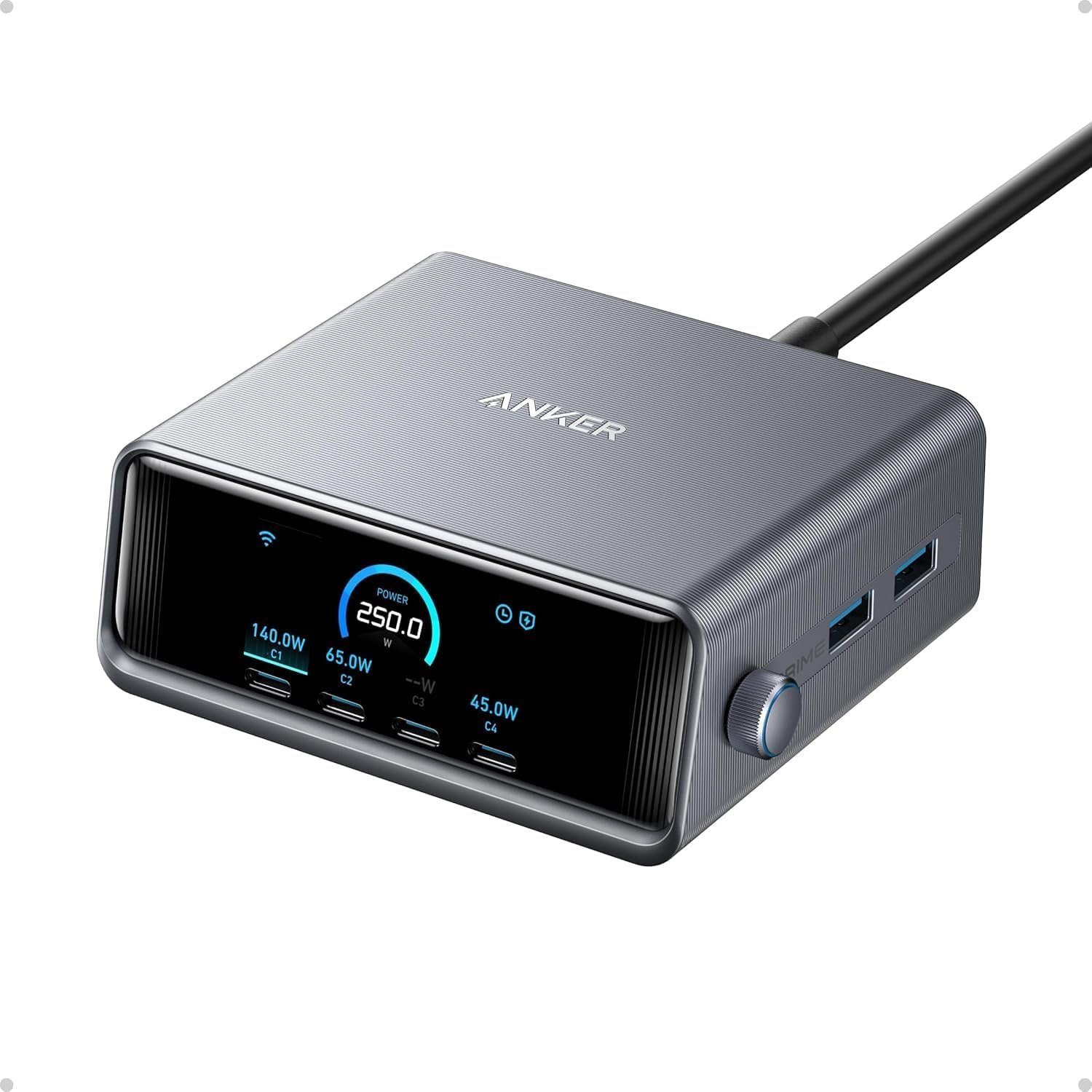
Anker Prime 250W Charging Station
As an Amazon Associate I earn from qualifying purchases.
Keeping several electronic devices charged can make an otherwise tidy desk surprisingly cluttered. Laptops, smartphones, tablets and accessories often require different adapters, leaving cables and chargers competing for the same electrical outlets.
The Anker Prime 250W Charging Station offers a more organised approach.
With six USB ports, intelligent power distribution and a built-in LCD display, this desktop charger is designed to handle several devices from one central location.
Its clean metallic finish and compact upright design also make it an attractive addition to a modern workspace.
Why It Works on a Modern Desktop
The Anker Prime brings four USB-C ports and two USB-A ports together in one charging station.
This provides enough connections for a laptop, phone, tablet and several smaller accessories without requiring six separate power adapters.
The charger uses Anker’s GaNPrime technology, combining gallium nitride electronics with intelligent power management.
Gallium nitride allows high-power charging components to be incorporated into relatively compact designs while improving electrical efficiency.
The result is a charger measuring approximately 4.18 × 1.58 × 3.64 inches.
It is substantial enough to sit as a permanent desktop accessory without occupying a large amount of working space.
Understanding the 250W Charging Capacity
The most important specification is the combined 250W maximum output.
This doesn’t mean every connected device receives 250W. Instead, the charging station distributes available power between its ports.
The first USB-C port supports up to 140W when used individually with a compatible device and cable.
The remaining three USB-C ports each support up to 100W individually.
Both USB-A ports support up to 22.5W each when used separately.
This arrangement makes it possible to connect more demanding equipment, such as a compatible laptop, alongside smaller devices.
For example, someone could charge a laptop while keeping a smartphone, tablet and wireless accessories connected.
Actual charging speeds depend on each device’s supported charging standard, the connected cables and how many ports are being used simultaneously.
Intelligent Power Distribution
Anker includes PowerIQ 4.0 technology to manage charging power.
The station can identify the requirements of connected devices and allocate power according to the selected operating mode.
Its default AI Power Mode automatically adjusts distribution based on connected equipment.
A Port Priority Mode allows users to favour particular connections when necessary.
This can be useful when a laptop needs charging more urgently than smaller accessories.
Rather than treating every connected device identically, the station provides a degree of control over how its available power is shared.
The advantage is convenience, particularly in workspaces where several devices are regularly connected.
A Display That Shows What’s Happening
The built-in 2.26-inch LCD display is one of the features that distinguishes this charger from ordinary USB adapters.
It provides information about charging activity and power distribution, allowing users to see how connected devices are drawing power.
The display is particularly useful when checking whether a laptop is receiving the expected charging output.
A control dial allows users to move through settings and adjust supported power-management options directly on the device.
This reduces the need to rely entirely on a smartphone application.
Anker also provides connected features and firmware updates for supported functions.
For users who enjoy understanding how their equipment operates, the display adds a genuinely useful element rather than being purely decorative.
Construction and Everyday Practicality
The charging station has a compact upright body with a metallic-looking finish and a clearly arranged front panel.
Its weight of approximately 640 grams gives it a substantial physical specification, making it better suited to a fixed desktop position than frequent travel.
The six ports are accessible from the front, allowing cables to be connected without constantly reaching behind a computer.
A separate AC power cable connects the unit to the mains supply.
Anker also includes its ActiveShield 3.0 protection system, designed to monitor operating temperatures and manage charging safety.
As with any high-power electrical accessory, adequate ventilation and compatible cables remain important.
A More Organised Workspace
The Prime 250W makes particular sense in a workspace containing several regularly used electronic devices.
A laptop, tablet and smartphone can share one charging location, helping reduce the number of individual adapters.
For example, our Samsung Galaxy Tab A9 Plus guide covers a portable tablet that can be charged using a suitable USB-C connection.
The charger could also sit alongside productivity equipment such as the Elgato Stream Deck Neo, which provides programmable shortcuts for frequently used computer tasks.
These products serve different purposes, but each contributes towards a more organised desktop.
The Anker focuses specifically on supplying power rather than adding another control device or USB data hub.
The Drawbacks
The Anker Prime 250W is a capable charging station, but its high output and additional technology won’t benefit everyone.
The 250W Output Is Shared
The most important limitation is how power is distributed.
Although the station offers up to 250W total, individual ports have their own maximum outputs.
Connecting several demanding devices means the available power must be shared.
The highest-powered USB-C port supports up to 140W individually, but that output may change when other equipment is connected.
Users should not assume they can charge several high-powered laptops at their maximum supported speeds simultaneously.
The actual distribution depends on connected devices and operating conditions.
Fast Charging Requires Compatible Cables
A powerful charger cannot compensate for an unsuitable cable.
To achieve the maximum 140W output, the connected equipment must support the appropriate charging standard and a suitably rated cable must be used.
Some laptops also have specific charging requirements.
Using an ordinary USB-C cable does not guarantee maximum charging performance.
Anyone purchasing this station for a particular laptop should verify the device’s charging specifications first.
Larger and Heavier Than a Wall Charger
At approximately 640 grams, the Prime is fairly substantial.
Its weight and separate mains cable make it convenient for a permanent desktop arrangement but less appealing for travel.
A small three-port wall charger is easier to carry in a laptop bag.
The upright body also requires some free desk space, particularly when several charging cables are connected.
For someone working from different locations every day, portability may matter more than having six ports.
The Display Won’t Appeal to Everyone
The LCD provides useful charging information, but not everybody needs to see individual power readings.
Someone who simply wants to charge a phone overnight may find the display unnecessary.
The screen and adjustable operating modes also introduce more complexity than a conventional plug-in charger.
The connected functions may require additional setup, while firmware and software features can change over time.
For users who prefer uncomplicated equipment, much of this technology may remain unused.
It Isn’t a Power Bank or USB Hub
Despite its sophisticated appearance, the Prime 250W is primarily a mains-powered charger.
It does not contain a battery for charging devices when disconnected from electricity.
It also doesn’t function as a USB data hub for connecting peripherals to a computer.
The six ports are intended for charging compatible devices, not transferring files or connecting external monitors.
Buyers looking for a docking station or portable battery will need different equipment.
High Output Doesn’t Always Mean Faster Charging
Many smartphones, earbuds and other smaller devices draw considerably less power than the station can provide.
Their internal charging systems determine how much power they accept.
A device limited to a relatively modest charging rate will not charge dramatically faster simply because it is connected to a 250W station.
Charging speeds also usually reduce as batteries approach full capacity.
The Prime’s main advantage is supplying several devices conveniently, rather than making every device charge faster.
It May Be More Charger Than Necessary
This is a specialised desktop accessory intended for people managing several electronic devices.
For someone using only a smartphone and one tablet, a smaller charger could provide everything required.
The extra connections, intelligent power allocation and LCD are most worthwhile when they are used regularly.
Otherwise, the Prime may introduce more equipment and complexity than the workspace actually needs.
Who It Suits Best
The Anker Prime 250W is particularly suitable for home-office workers, computer enthusiasts and people who regularly charge several USB-powered devices.
Its high-output USB-C connection makes it relevant to users with compatible laptops, while the additional ports accommodate tablets, smartphones and smaller accessories.
The display and power controls will appeal to people who like monitoring and managing their charging equipment.
For more useful desktop technology and connected devices, explore our Audio, Computing & Entertainment guides.
Those who only need occasional phone charging or prefer lightweight travel accessories may find a simpler charger more appropriate.
Is the Anker Prime 250W Worth the Desk Space?
The Anker Prime 250W combines substantial charging capacity, six conveniently arranged ports and intelligent power management in a compact desktop design.
Its LCD display provides useful information, while the adjustable power settings offer flexibility for people charging different devices throughout the day.
The main compromises are its weight, dependence on mains power and the fact that its 250W capacity must be shared between connected equipment.
For someone managing a laptop, smartphone, tablet and several accessories, however, the Prime offers a practical way to simplify a busy charging setup.
Its strongest advantage is not simply delivering more power, but bringing everyday charging together in one organised place.
As an Amazon Associate I earn from qualifying purchases.