PLAUD Note Pro AI Voice Recorder
As an Amazon Associate I earn from qualifying purchases.
The PLAUD Note Pro AI Voice Recorder is a compact recording device designed to turn spoken conversations into useful digital information.
Rather than simply storing audio files, it works with PLAUD’s AI software to produce transcripts, summaries, meeting notes and action points.
It is particularly interesting for professionals who attend regular meetings, conduct interviews, speak with clients or need to remember detailed conversations without constantly writing notes.
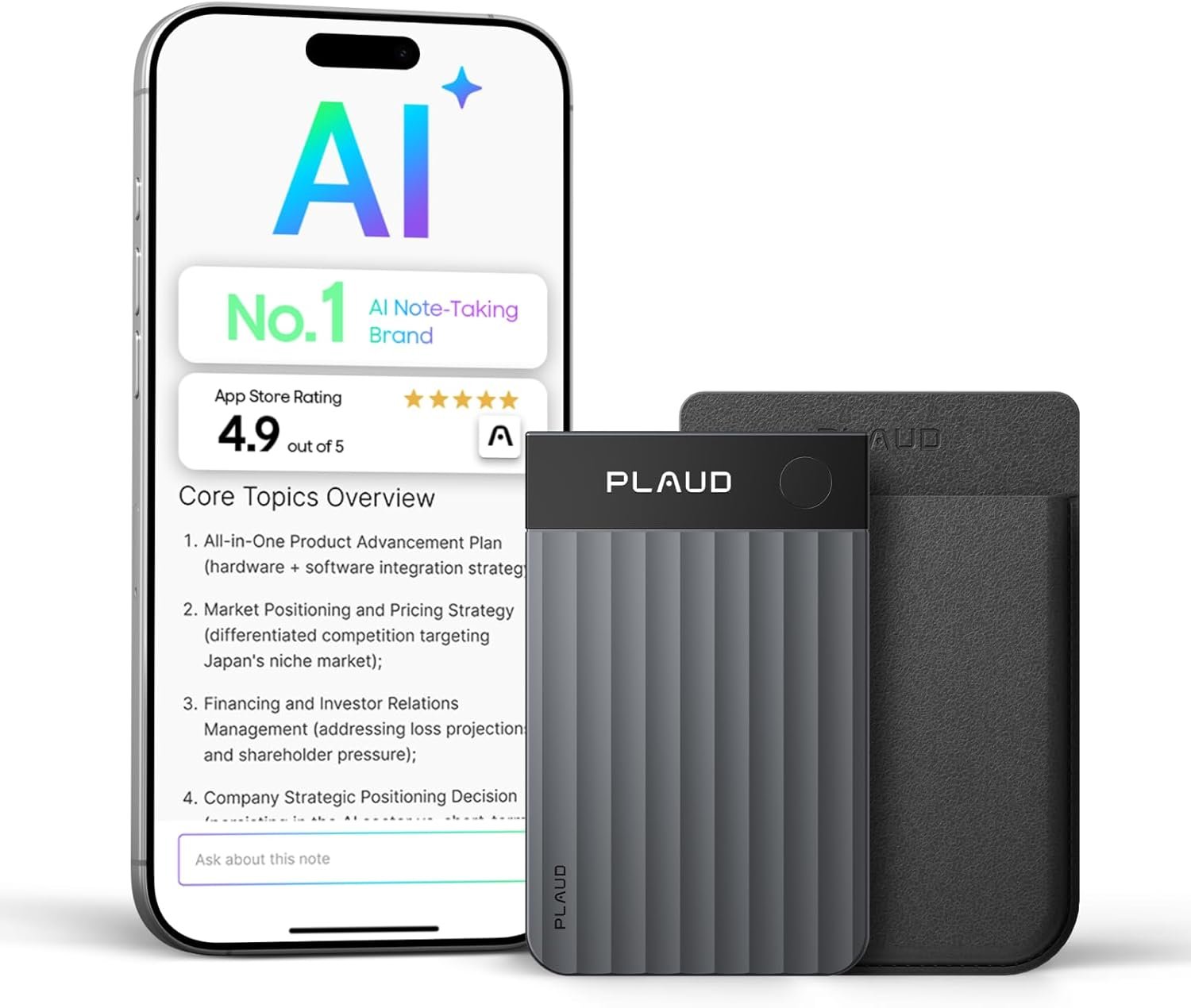
The Note Pro combines four MEMS microphones, a vibration pickup unit for compatible phone-call recording, a small AMOLED display and 64GB of internal storage.
Its exceptionally thin design allows it to be carried in a pocket or attached to the back of a compatible smartphone using the supplied magnetic accessories.
However, its greatest attraction is also its most important limitation. The recording hardware is only one part of the product. To benefit fully from AI transcription and intelligent summaries, users must also consider software compatibility, internet access, privacy and ongoing transcription allowances.
For people who regularly need accurate records of spoken information, the PLAUD Note Pro offers an interesting alternative to taking notes manually or relying entirely on a smartphone.
Why It Works for Everyday Productivity
Meetings and conversations can contain far more information than someone can comfortably remember.
Important details may be mentioned briefly, decisions can change during a discussion, and useful ideas are easily forgotten when several people are speaking.
Traditional note-taking helps, but writing everything down introduces another problem.
The person taking notes may spend so much time concentrating on the words that they become less involved in the conversation.
The PLAUD Note Pro addresses this by separating the process of capturing information from the task of organising it.
The device records the conversation, while the accompanying software can turn the audio into searchable text.
From there, AI tools can identify important subjects, produce summaries and organise information into a more convenient format.
This can be useful when preparing meeting minutes, keeping track of decisions or revisiting a complicated discussion.
The real benefit is not simply having another recording device.
It is the possibility of turning an otherwise lengthy audio recording into information that is easier to locate and use.
That distinction is what makes the Note Pro relevant to everyday productivity.
What It Feels Like to Use
The PLAUD Note Pro has a restrained, professional design.
Its slim black body is approximately the size of a credit card, making it considerably less bulky than a traditional handheld digital voice recorder.
PLAUD specifies dimensions of 85.6 × 54.1 × 2.99mm and a weight of approximately 30g.
The body combines an aluminium alloy construction with Corning Gorilla Glass, giving the product a more considered appearance than a conventional plastic recording device.
A small 0.95-inch AMOLED InstantView display provides information about the device and recording status.
It is not intended to replace a smartphone screen or provide a complete transcript directly on the recorder.
Instead, the display allows the user to see essential information without opening the accompanying app.
Simple Recording Controls
Starting a recording is straightforward.
The Note Pro uses a physical recording button rather than requiring the user to navigate through several on-screen menus.
Pressing and holding the button starts recording, while another long press stops it.
Vibration feedback confirms the action.
During a recording, a short press can mark an important moment for later reference.
This is particularly useful when somebody makes an important decision or mentions information that will need attention afterwards.
Rather than searching through an entire conversation, the user can return to highlighted moments.
However, marking useful passages still requires someone to remember to press the button.
The device can capture audio automatically once recording has started, but it cannot know which information the user personally considers most important.
Four Microphones and Voice Capture
The PLAUD Note Pro uses four MEMS microphones and a vibration pickup unit.
The microphones are intended for recording spoken conversations in rooms, offices and other suitable environments.
PLAUD advertises a pickup range of up to five metres when using the enhanced recording mode.
This can be useful for small meetings where several people are seated around a table.
The device also supports a longer-duration recording mode with a reduced specified pickup range.
Recording Quality Depends on the Room
A five-metre pickup specification does not guarantee that every voice will be captured with equal clarity.
Someone sitting close to the recorder will generally be easier to capture than a person speaking quietly from the opposite side of a noisy room.
Air conditioning, traffic, background conversations and room acoustics can all affect the recording.
The position of the device therefore matters.
For a meeting around a table, placing the recorder somewhere reasonably central may produce a more balanced result than leaving it in a pocket.
It is also sensible to perform a short recording test before relying on it for an important interview or presentation.
The hardware offers useful capabilities, but good microphone placement remains important.
AI Transcription in 112 Languages
One of the Note Pro’s main attractions is its ability to work with PLAUD Intelligence for speech transcription.
PLAUD currently advertises support for 112 languages.
This makes the device potentially useful for international meetings, multilingual discussions and anyone who regularly needs written records of spoken information.
After a recording has been transferred to the PLAUD app, the software can process the audio into text.
Speaker identification features can also help distinguish different voices.
For a meeting with several participants, this can make a transcript easier to follow.
Instead of presenting one long block of text, the software attempts to organise the discussion by speaker and context.
Custom Vocabulary
PLAUD also provides custom vocabulary features designed to improve recognition of specialist terminology.
This could be useful in professional conversations involving technical language, product names or industry-specific terms.
However, vocabulary assistance does not eliminate transcription errors.
Unusual accents, overlapping speech, unfamiliar names and poor recording conditions can still produce mistakes.
The transcript should always be checked before being used as an official or important record.
Searchable Information
A written transcript is considerably easier to search than a lengthy audio recording.
Rather than listening through an entire meeting to find one decision, a user can search the text for relevant words or topics.
This can be helpful when preparing follow-up emails, reviewing discussions or checking what was agreed.
The original recording remains important because the AI-generated transcript may contain errors or omissions.
For serious work, the transcript is best treated as an aid to understanding rather than an unquestionable account of every spoken word.
Turning Recordings Into Useful Summaries
Recording a meeting is only the first part of the process.
A lengthy transcript may contain valuable information, but it can still take considerable time to read.
PLAUD Intelligence aims to reduce that work by generating structured summaries.
Depending on the available software features and chosen template, these can organise information around important subjects, decisions, follow-up tasks and other points of interest.
For example, a business meeting might produce a summary containing the principal discussion topics, decisions made and tasks requiring further action.
An interview could be organised around questions, answers and important observations.
A lecture or presentation might be condensed into sections that are easier to revisit.
Meeting Notes and Action Points
Action-point extraction is particularly useful when several people have responsibilities following a meeting.
Instead of relying on memory, the software can help identify work that was discussed.
However, users should verify that the correct people, dates and responsibilities have been identified.
AI can misunderstand a suggestion as a firm decision or overlook an important qualification.
The summary provides a convenient starting point, but human judgement is still necessary.
Templates for Different Tasks
PLAUD provides a large collection of summary templates for different professional situations.
These allow the same recorded information to be presented in different ways.
Someone preparing meeting minutes may want a different structure from somebody creating interview notes or a project summary.
This flexibility is useful, although not everyone will need such an extensive selection.
For ordinary personal notes, a simple transcript and concise summary may be entirely sufficient.
Recording Phone Calls
The PLAUD Note Pro can also record compatible phone conversations.
It uses a vibration pickup system designed to capture call audio when the recorder is correctly attached to a smartphone.
The Note Pro has a smart dual-mode feature that distinguishes between in-person recording and supported phone-call recording.
This reduces the need to switch recording modes manually.
However, the user still needs to start the recording.
The device should not be treated as an automatic system that secretly records every incoming or outgoing call.
Magnetic Phone Attachment
PLAUD includes a magnetic case and magnetic ring with the recorder.
The magnetic case allows the device to attach to a compatible magnetic smartphone.
For phones without a suitable magnetic surface, the supplied ring provides an alternative attachment method.
An important detail is that the recorder itself does not contain the attachment magnet.
The magnetic connection is provided by the case.
The attachment should be checked carefully before carrying the phone with the recorder fitted.
Headphone Limitations
Phone-call recording also has practical limitations.
PLAUD states that the Note Pro cannot properly capture the other person’s voice when the user is wearing earphones during a call.
That matters for people who routinely make calls using wireless earbuds or a headset.
Those users should check whether the recording arrangement suits the way they normally communicate.
It would be unwise to assume that every calling method works equally well.
Battery Life and Internal Storage
PLAUD specifies a 500mAh battery for the Note Pro.
Its recording time depends on the selected operating mode.
Enhance Mode provides up to 30 hours of continuous recording with a specified pickup range of up to five metres.
Endurance Mode provides up to 50 hours of continuous recording with a reduced pickup range of approximately three metres.
These figures represent the manufacturer’s stated maximums rather than guaranteed performance in every situation.
Actual results will depend on operating conditions and device settings.
Choosing the Right Mode
Enhance Mode is the more appropriate choice when capturing voices across a larger meeting room.
Endurance Mode is intended for longer recording sessions where the extended operating time is more important than the maximum pickup range.
The choice is therefore a practical compromise between recording duration and audio capture performance.
Local Recording Storage
The recorder includes 64GB of internal storage.
Audio is initially stored on the device and can later be transferred to the PLAUD app.
This means the recorder can capture audio without requiring a continuous internet connection.
However, local storage is finite.
Recordings need to be transferred and managed periodically.
It is also important to distinguish storing audio from creating an AI transcript.
The device itself captures the recording, while transcription and intelligent processing depend on the associated software services.
The PLAUD App and Software Experience
The PLAUD Note Pro works with PLAUD’s mobile and web-based software.
The app provides access to recordings, transcripts and AI-generated information.
Bluetooth and Wi-Fi are used as part of the transfer and connectivity system.
PLAUD also provides desktop software for supported workflows involving online meetings.
This combination makes it possible to work with information across several devices.
A user might capture a conversation with the recorder, transfer it to the app and later examine the transcript on a larger screen.
For professionals who regularly move between their phone and computer, this can be particularly convenient.
However, it introduces a dependency on the manufacturer’s software platform.
The Note Pro is not simply a traditional recorder that produces every finished document without additional processing.
People who want an entirely offline transcription system should understand that distinction before choosing it.
For an alternative approach to portable AI technology, our Samsung Galaxy S25 Ultra AI Smartphone article explores a multifunction device with a much broader collection of everyday features.
The dedicated Note Pro is a more specialised tool, concentrating on capturing and organising spoken conversations rather than replacing a smartphone.
Free Transcription Allowance and Subscription Plans
One of the most important questions about the PLAUD Note Pro concerns its ongoing software requirements.
The device includes access to PLAUD’s Starter plan.
At the time of writing, this provides 300 minutes of AI transcription per month.
For somebody recording occasional meetings, interviews or personal notes, that may be sufficient.
However, frequent users can reach the allowance surprisingly quickly.
An hour-long meeting uses 60 minutes of transcription allowance when processed.
Someone recording several lengthy meetings each week could therefore exceed the free allocation.
What Happens When More Transcription Is Needed?
PLAUD offers additional plans with larger transcription allowances.
The Pro plan currently provides 1,200 transcription minutes per month, while an Unlimited option is also advertised, subject to the provider’s usage conditions.
Additional transcription minutes may also be available separately.
Plan features and allowances can change, so buyers should check the current terms directly with PLAUD.
The important distinction is that owning the physical recorder does not automatically provide unlimited AI transcription.
The ongoing software arrangement should be considered part of the product’s practical usefulness.
Privacy and Recording Consent
The Note Pro is designed to capture conversations, and that creates responsibilities beyond ordinary gadget ownership.
Meeting recordings may contain names, contact information, financial details, confidential business discussions or other sensitive information.
Users should understand where recordings are stored, how they are transferred and how the accompanying software processes them.
PLAUD publishes information about its security standards and data protection measures.
Nevertheless, manufacturer security claims do not remove the need to follow workplace policies or protect confidential information.
Always Consider Consent
Recording laws vary between locations and circumstances.
Some conversations require the consent of everyone participating.
Employers, schools and professional organisations may also have their own recording policies.
Users should therefore check the applicable requirements and obtain consent where necessary before recording.
The Note Pro should be used as a legitimate productivity tool, not as a means of recording people without appropriate permission.
The Drawbacks
The PLAUD Note Pro offers a useful combination of recording hardware and AI software, but several limitations deserve careful consideration.
These are particularly important because the product handles spoken information that users may depend upon for work, meetings and important decisions.
The Free Transcription Allowance Is Limited
The included Starter plan provides 300 transcription minutes per month.
That may sound generous for occasional personal use, but it represents only five hours of audio.
Someone attending several meetings each week can use that allowance quickly.
The recorder may still be capable of capturing more audio, but processing additional recordings into transcripts can require extra transcription minutes or a different plan.
This distinction is easy to overlook.
People who want to transcribe lengthy conversations regularly should consider their expected usage before deciding whether the Note Pro is suitable.
Ongoing Software Dependence
The Note Pro is not a completely self-contained AI transcription device.
Its most interesting functions depend on the PLAUD software environment.
Recording audio is only the beginning of the process.
To create transcripts, summaries and other AI outputs, users need access to the accompanying software and supported processing services.
This introduces a dependency on the manufacturer’s continued software support.
Features, service terms and subscription allowances may change over time.
Anyone who prefers devices that remain fully functional without cloud-based services may find a conventional digital recorder more appropriate.
AI Transcripts Can Contain Mistakes
Speech recognition technology has improved considerably, but it is not infallible.
Accents, technical expressions, unusual names and overlapping conversations can cause errors.
Background noise may make the problem worse.
The software may also incorrectly identify who said something.
This matters when creating meeting minutes or records of important discussions.
A transcript should never automatically be considered an exact legal or professional record.
Users must check important information against the original audio.
AI Summaries Can Misinterpret Decisions
Summarising a conversation requires interpreting what was said.
A meeting participant might suggest an idea without agreeing to implement it.
Another person may raise a concern that changes the meaning of an earlier statement.
An AI-generated summary can occasionally miss those distinctions.
It might present a tentative suggestion as an agreed action or omit an important qualification.
For casual personal notes, such mistakes may be relatively minor.
For business, legal, medical or financial discussions, they could be significant.
The software is best used to prepare a draft summary that can be checked, corrected and approved by a person.
Voice Pickup Has Real-World Limits
The advertised recording range describes performance under suitable conditions.
It does not guarantee equally clear speech from every participant in a busy environment.
Large rooms, soft voices, background conversations and reflective surfaces may reduce clarity.
A recording made from inside a bag or pocket may also be less useful than one captured with the microphones correctly positioned.
The Note Pro is a compact personal recorder, not a complete professional conference microphone system.
Anyone regularly recording large group discussions should consider microphone placement and the particular acoustic environment.
Phone-Call Recording Is Not Universal
The phone-call recording feature is useful, but compatibility and operating conditions matter.
The recorder needs to be correctly positioned against the phone.
It also requires the user to start recording rather than assuming that every call will be captured automatically.
PLAUD states that using earphones during phone-call recording prevents the Note Pro from properly capturing the other participant’s voice.
This could be a significant drawback for people who make most of their calls using wireless earbuds or headsets.
The feature is therefore more specialised than the simple phrase “phone-call recording” might suggest.
Magnetic Attachment Requires Care
The Note Pro uses a supplied magnetic case to attach to compatible smartphones.
The recorder itself does not contain the attachment magnet.
This means the case is an important part of the phone-mounted arrangement.
Phones without a suitable magnetic surface require the included adhesive ring.
That adds another component and may be inconvenient for people who frequently change phone cases.
The attachment should also be checked before carrying the phone.
A slim recorder may be easy to forget about, but an insecure attachment could allow it to fall.
Cloud Processing Raises Privacy Questions
The Note Pro may be used for conversations containing confidential or personal information.
Although PLAUD publishes security and compliance information, users still need to understand how their recordings are handled.
This is especially important in workplaces with restrictions on external AI services.
Recording a meeting does not automatically grant permission to upload its contents for cloud-based transcription.
Users may need approval before storing or processing particular types of information.
For highly confidential work, an approved organisational recording system may be more suitable.
Consent Requirements Cannot Be Ignored
A compact recorder makes capturing conversations convenient, but that convenience must be balanced against privacy rights and legal obligations.
Recording laws differ between countries and states.
Workplace rules may impose additional restrictions.
The fact that the Note Pro can record a conversation does not mean it is always appropriate or lawful to do so.
Users should explain when recording is taking place and obtain permission where required.
This is particularly important when recording interviews, client meetings or private discussions.
It Is Another Device to Charge and Manage
Many smartphones already have basic voice-recording functions.
The Note Pro introduces an additional piece of hardware.
It needs charging, software updates and occasional file management.
The user must also remember to carry it, start recordings and transfer important files.
For someone who regularly attends meetings, those tasks may be justified by the more specialised recording features.
For occasional personal notes, however, the extra device may add unnecessary complexity.
The Display Has a Limited Purpose
The built-in AMOLED display is a welcome addition compared with the original PLAUD Note.
It makes recording information easier to see at a glance.
However, it is still a very small display.
It does not provide a comfortable way to read lengthy transcripts or work through detailed meeting summaries.
Those tasks remain better suited to a smartphone, tablet or computer.
Buyers should regard the display as a useful recording-status feature rather than a replacement for the accompanying app.
Longer Battery Life Requires a Compromise
PLAUD advertises up to 50 hours of recording in Endurance Mode.
However, its maximum specified pickup range is reduced compared with Enhance Mode.
Enhance Mode offers stronger voice pickup over greater distances but a shorter maximum recording duration.
This means the longest battery-life figure and the greatest microphone range should not be treated as simultaneous guaranteed capabilities.
Users need to choose the mode that suits their recording conditions.
For important meetings, recording quality may be more valuable than extending the battery duration.
It May Be Unnecessary for Occasional Notes
The Note Pro makes most sense when spoken information needs to be captured and organised regularly.
Someone who records only a few short reminders each month may already have everything necessary on their smartphone.
Adding a dedicated recorder and AI service could be more complicated than simply using an existing notes or voice-memo app.
The Note Pro’s value comes from the combination of hardware convenience, structured transcription and regular use.
Without those requirements, its advanced features may be underused.
Who It Suits Best
The PLAUD Note Pro is particularly well suited to professionals who regularly work with spoken information.
Consultants, project managers, interviewers, business owners and other people attending frequent meetings may appreciate being able to capture conversations and organise the results afterwards.
It can also be useful for students and researchers who need to revisit lectures, interviews or detailed discussions, provided recording is permitted.
The small size makes it convenient for people who move between different working locations.
Its physical recording controls and dedicated microphones distinguish it from a conventional smartphone application.
People interested in other approaches to hands-free information capture may also find our Oakley Meta HSTN AI Smart Glasses article relevant.
Those glasses take a different approach to wearable technology, combining visual capture and connected assistance, while the Note Pro concentrates on spoken conversations and structured notes.
However, the PLAUD is less attractive for someone who needs a completely offline transcription system, cannot use cloud-based processing or records only occasional personal reminders.
Its usefulness depends on having a genuine need to turn recorded speech into organised information.
Is the PLAUD Note Pro Worth Carrying?
The PLAUD Note Pro offers an interesting approach to AI-assisted productivity.
Its compact metal body, dedicated microphones, AMOLED display and phone attachment system make it practical to carry without adding much bulk.
The recording hardware is thoughtfully focused on capturing conversations, while PLAUD Intelligence provides transcription, summaries and other organisational features.
The distinction between recording and processing remains important.
The device can store audio locally, but its more advanced capabilities rely on the PLAUD software platform and transcription allowances.
Accuracy, privacy and recording consent also require careful attention.
For someone who regularly attends meetings or works with spoken information, the Note Pro could reduce the time spent organising recordings and preparing written notes.
For occasional use, an ordinary smartphone recorder may be sufficient.
Ultimately, the strongest reason to choose the PLAUD Note Pro is not simply that it records voices.
It is that it can help transform conversations into searchable, structured information that remains useful long after the original discussion has ended.
Explore more practical devices and thoughtful innovations in our Personal Tech & Wellness collection.
As an Amazon Associate I earn from qualifying purchases.