
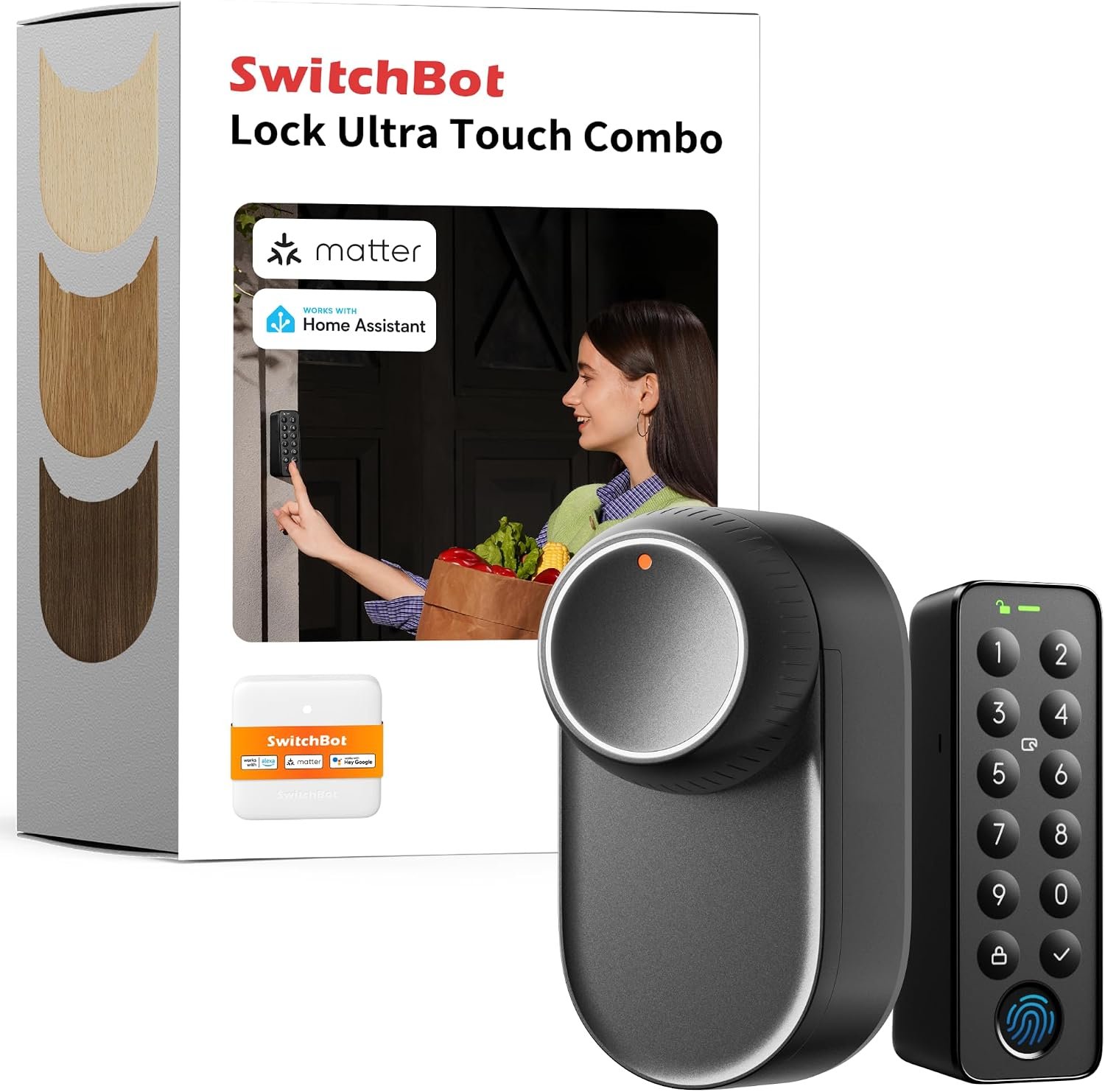
SwitchBot Smart Lock Ultra with Keypad
As an Amazon Associate I earn from qualifying purchases.
The SwitchBot Smart Lock Ultra with Keypad takes an interesting approach to smart security. Instead of demanding that you remove the existing lock from your door and replace the whole mechanism, it is designed to work with the lock already fitted.
That immediately makes it more appealing for people who like the idea of fingerprint entry, PIN access and app control but do not necessarily want to start altering the door itself.
The Lock Ultra sits on the inside of the door and physically turns the existing lock mechanism for you. Outside, the separate keypad provides another way into the house without reaching for a conventional key.
It is a good example of the kind of home technology that makes sense for GizRPT: the electronics are not there simply for novelty. They solve a genuine everyday problem.
Why the retrofit approach matters
Replacing a complete door lock is not always straightforward.
There may be drilling involved, the replacement must suit the existing door and hardware, and renters may not be allowed to make permanent alterations.
SwitchBot takes a different route.
Rather than replacing everything, the Lock Ultra acts as a motorised controller for the existing lock. You retain the original locking mechanism and add the smart functionality around it.
That has another useful consequence.
The traditional key does not suddenly become irrelevant.
For many households, keeping the familiar mechanical method available alongside the electronic alternatives is considerably more reassuring than committing entirely to a new electronic lock.
It also means family members do not all have to use the system in exactly the same way.
One person can use their fingerprint. Another might prefer a PIN. Someone else may continue using the conventional key.
Good smart-home technology should provide choices rather than forcing everybody to change their habits.
Fingerprint entry is the feature that makes sense immediately
Of all the available smart-lock features, fingerprint access is probably the easiest to understand.
Walk up to the door, place your finger on the keypad and unlock it without searching pockets or bags for a key.
That becomes particularly useful when carrying shopping, coming home in poor weather or dealing with children and bags at the same time.
It also removes another familiar problem: forgotten keys.
The keypad provides PIN entry as another option, so fingerprint recognition does not have to be the only electronic way inside.
That flexibility matters in a household where several people may need access.
It can also be useful when someone needs temporary access without being given a permanent physical key.
App control adds another layer
The SwitchBot app brings the lock into the wider connected-home environment.
Instead of the lock simply being a mechanical object on the door, its status and operation can become part of the household’s smart system.
That can include checking lock information, controlling supported functions and configuring features such as automatic locking.
Auto-lock is particularly attractive for anyone who occasionally gets halfway down the road and wonders:
Did I actually lock the door?
A system capable of automatically locking after the door is closed can remove some of that uncertainty.
There is an important difference, however, between something being convenient and something being infallible.
I would still want to develop the habit of checking that the door has physically closed properly rather than assuming the electronics can overcome a badly aligned door or stiff deadbolt.
A smart lock still depends on the mechanical lock
This is easy to overlook.
SwitchBot can automate the action of turning the lock, but it cannot magically repair a door that is already difficult to lock manually.
If you currently need to push the door hard, lift the handle, pull it toward you or jiggle the key before the bolt moves smoothly, deal with that problem first.
A small electric motor is being asked to perform the same physical movement that your hand normally performs.
The smoother the original lock operates, the better the foundation for automation.
Before fitting any smart lock, I would open and close the door repeatedly and make sure the existing mechanism operates cleanly.
That simple check could prevent a great deal of frustration later.
What it feels like to use
The biggest change is not really the motor inside the house.
It is what happens when you arrive at the front door.
With a normal lock, there is a small routine that most of us barely notice: find the keys, select the correct one, position it and turn the lock.
Fingerprint access removes almost all of that.
That may sound trivial until you repeat it several times every day.
Useful home technology often works this way.
The individual time saving is tiny, but the reduction in everyday friction is noticeable because the task happens so frequently.
There is also something useful about having several methods available.
Technology inevitably fails occasionally. Fingers can be wet, batteries eventually need attention and phones can be left somewhere else.
Having fingerprint, keypad and conventional mechanical access rather than relying on one method makes much more sense.
The keypad is more important than it first appears
It would be easy to concentrate entirely on the Lock Ultra itself, but the keypad changes how useful the system becomes.
Without an external access method, a smart lock can still leave you reaching for your phone.
That is not necessarily much more convenient than reaching for a key.
Fingerprint and PIN access remove the phone from the normal unlocking process.
That is an important distinction.
A good smart-home system should quietly disappear into everyday life rather than requiring you to open an app every time you want something to happen.
The phone is useful for setup, management and remote functions.
It should not need to become the replacement for every switch and key in the house.
Useful for families
Different users can prefer different methods of entry.
Adults may use fingerprints while children or other family members could use a PIN or another supported access method.
It also avoids the problem of having numerous physical keys circulating.
That can be particularly useful when access occasionally needs to be given to somebody outside the immediate household.
The ability to manage electronic access is fundamentally different from handing somebody a key that can potentially be copied and then has to be collected afterwards.
As with any security system, though, access permissions still need sensible management.
Old codes and users should not simply accumulate forever.
Connected-home integration
The Lock Ultra can be incorporated into the wider SwitchBot ecosystem and supports integration with major smart-home platforms.
That creates possibilities beyond simply unlocking the front door.
A connected lock could form part of routines involving lighting, sensors or other devices, depending on the rest of the system being used.
This is where smart locks begin to become more interesting than remote-controlled versions of ordinary locks.
The value is not necessarily in asking a voice assistant to unlock the door.
It is in allowing door status to become another piece of useful information inside the connected home.
There is, however, an important complication here that deserves attention.
SwitchBot’s different hubs, bundles and integrations can affect exactly which remote and smart-home features are available.
Do not assume every feature mentioned across the SwitchBot ecosystem works from the Lock Ultra alone.
Check what is included in the particular package you are buying and whether a compatible SwitchBot hub is required for the integrations you intend to use.
Battery design matters more in a smart lock
Battery life is important in any wireless device.
It becomes much more important when the device is attached to the front door.
A wireless temperature sensor going flat is inconvenient.
A smart lock losing power feels considerably more significant.
SwitchBot has built multiple levels of power backup into the Lock Ultra system, which is sensible for this type of product.
Even so, battery warnings should never become one of those notifications that gets repeatedly dismissed.
Once installed, checking the lock’s battery status occasionally should become part of maintaining it.
Fortunately, the original mechanical lock remains relevant, which is another reason the retrofit concept is attractive.
The drawbacks
There is a lot to like about the concept, but a smart lock is one product where I would examine the disadvantages very carefully before buying.
Door compatibility comes first
Do not buy it simply because the photograph of your lock looks similar to one in the listing.
SwitchBot says the Lock Ultra works with a wide range of American locks, but there are still variations in cylinders, thumb turns, door furniture, clearances and installation positions.
Some lock types require additional adapters.
The exact lock on your door should be checked against SwitchBot’s compatibility information before ordering.
This is particularly important with unusual hardware or older doors.
The US version also should not be assumed to fit European lock systems. Different versions and mounting hardware exist for different markets.
Installation may be easy, but setup still matters
“Retrofit” does not mean that every installation will be completely effortless.
The physical position of the lock matters.
The motor needs to align properly with the existing mechanism and the system must understand the locked and unlocked positions.
A poor installation could turn an otherwise good product into something unreliable.
I would allow time to install and calibrate it properly rather than treating it as a gadget that can be stuck to the door in five minutes before leaving the house.
Your existing lock needs to work smoothly
This is perhaps the most practical drawback of all.
If the deadbolt or lock is stiff, badly aligned or requires pressure on the door before it turns, adding a motor does not solve the underlying mechanical problem.
It may actually expose it.
A motorised lock works best when the existing mechanism already moves freely.
Older doors often shift slightly with temperature and humidity too.
A lock that operates beautifully in summer might become tighter during winter.
That is something worth remembering before assuming every failed electronic lock attempt is actually an electronics problem.
Electronics add another layer of failure
A mechanical key and lock are comparatively simple.
Add a motor, batteries, Bluetooth, Wi-Fi connectivity, fingerprint recognition, an app and smart-home integrations and there are more things that can potentially misbehave.
That does not make the SwitchBot a bad idea.
It is simply the cost of gaining the extra functionality.
There may occasionally be a connection issue, a fingerprint may not register first time or an app may need updating.
Anyone buying a smart lock should be comfortable with at least a small amount of technology management.
Fingerprints are convenient, not magical
Fingerprint recognition is one of the main attractions, but real-world fingers are not always clean and dry.
Wet hands, dirty fingers, cuts or gloves can interfere with biometric readers.
That is precisely why having PIN and conventional access available matters.
I would register more than one finger for regular users where the system allows it rather than depending entirely on a single fingerprint.
The keypad lives outside
The interior lock mechanism sits inside the house, but the keypad is exposed to the outside environment.
That means it has to cope with weather, temperature changes, dirt and regular physical use.
SwitchBot designs the keypad for outdoor installation, but outdoor electronics still deserve sensible placement.
If the doorway provides some shelter from constant direct rain and strong sunlight, so much the better.
Battery management never disappears
SwitchBot has clearly put thought into backup power, but batteries are still batteries.
They eventually need charging or replacing.
For somebody who wants a completely maintenance-free door lock for the next decade, a conventional mechanical lock remains difficult to beat.
The important thing is not whether the battery eventually runs down.
It is whether the owner pays attention to the warnings before that happens.
Smart-home features can become confusing
This is an area where I would read the small print carefully.
The Amazon listing mentions Wi-Fi and compatibility with systems such as Alexa and Google, while SwitchBot also uses its Hub products for some remote control and wider smart-home functions.
Matter and Apple Home integration can also depend on the correct SwitchBot hub and configuration.
That means the precise combination of features available can depend on what other SwitchBot equipment is present.
If you are buying specifically for one particular ecosystem, check that requirement before ordering rather than assuming every advertised integration works directly out of the box.
Automatic unlocking needs careful thought
Auto-unlock sounds extremely convenient.
Your phone knows you are approaching and the system prepares the door for you.
But this is a feature I would configure conservatively.
Convenience is worthwhile, but the front door is not the place where I would enable every automation simply because the option exists.
I would start with fingerprint or PIN access, become familiar with how reliably the lock behaves and only then explore more automated routines.
A smartphone can become another dependency
One advantage of the fingerprint keypad is that normal entry does not have to depend on a phone.
That is important.
Phones run flat, Bluetooth can misbehave and operating-system permissions sometimes change after updates.
I would therefore regard phone control as an additional feature rather than the primary way of entering the house.
It adds visible hardware
The Lock Ultra is still a physical device attached to the inside of the door.
Some people will barely notice it.
Others may prefer the cleaner appearance of a smart lock built completely into the door hardware.
The retrofit design is a practical compromise: easier installation in exchange for having an additional device mounted over the existing lock.
Renting still requires common sense
The non-destructive nature of a retrofit smart lock makes it particularly interesting for renters, but that does not automatically mean every landlord or tenancy agreement will permit it.
Installation method, adhesive surfaces and responsibility for any marks should still be considered.
If the door is not yours, checking first is sensible.
Do not treat smart features as improved physical security
This distinction is important.
Adding fingerprint entry, app control and automatic locking does not make a weak door, poor frame or inadequate deadbolt physically stronger.
The SwitchBot controls the existing lock.
The underlying mechanical security of the door still matters.
Technology can improve access control and make it easier to ensure the door is locked, but it should not be confused with reinforcing the structure of the door itself.
Who it suits best
The SwitchBot Smart Lock Ultra with Keypad makes most sense for somebody who likes smart-home technology but does not want to replace the entire existing door lock.
It is particularly appealing if fingerprint entry is the main attraction.
It also suits households where several people need different ways to enter, or where conventional keys are frequently misplaced.
People already using other SwitchBot equipment may get additional value from integrating the lock into the same system.
Renters may also find the retrofit approach attractive, provided installation is permitted and the existing lock is compatible.
It is less suited to somebody who wants absolute simplicity.
If the idea of maintaining batteries, apps, connectivity and electronic access sounds like unnecessary complication, a good mechanical lock remains perfectly sensible.
Likewise, anyone with a stiff or unreliable existing door lock should sort out the mechanical problem before adding automation.
Is it worth adding smart technology to the front door?
The SwitchBot Smart Lock Ultra with Keypad makes a convincing case for smart access because it does not require abandoning the lock already fitted to the door.
Fingerprint entry is genuinely useful.
PIN access gives another practical option.
App control and smart-home integration add further possibilities without needing to be the way you unlock the door every day.
Most importantly, the traditional lock remains underneath it all.
That combination of old and new technology is probably the strongest part of the design.
The reservations are equally clear. Compatibility needs checking, installation and calibration matter, batteries need maintaining and some connected features may require additional SwitchBot hardware.
It also cannot improve the physical strength of the existing lock or door.
For a compatible, smoothly operating door, however, it offers a useful way to gain modern keyless access without committing to a complete replacement lock.
For more connected devices and practical home automation ideas, explore our Smart Home & Security guides on GizRPT.
As an Amazon Associate I earn from qualifying purchases.