
Amazon Fire HD 10 Kids Tablet
As an Amazon Associate I earn from qualifying purchases.
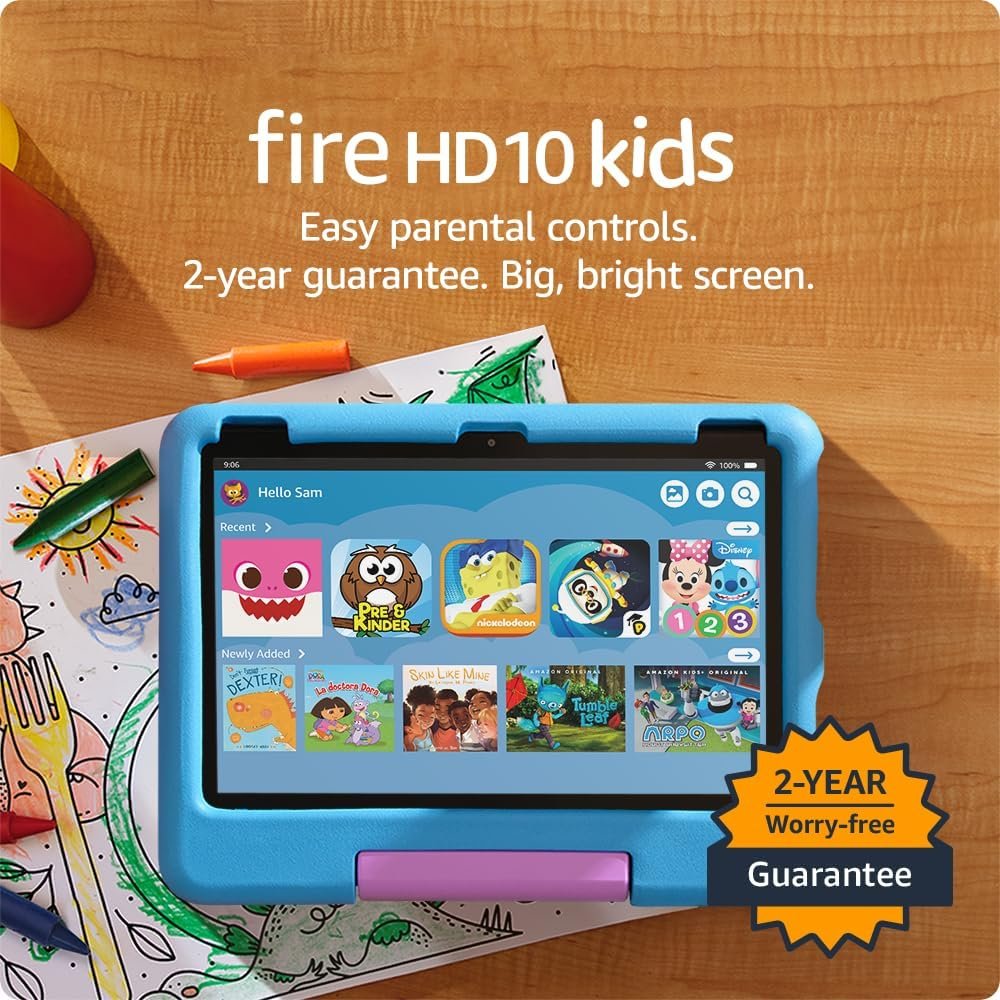
The Amazon Fire HD 10 Kids Tablet brings together a large Full HD display, a protective case and parental controls in a device designed for younger children.
Originally introduced in this version in 2023, the tablet was developed primarily for children aged 3 to 7. It combines the familiar functions of an everyday tablet with a child-focused interface and access to books, educational applications, games and entertainment.
For parents, the attraction is not simply the technology inside the device. It is the ability to give a child their own digital space while retaining control over the content they can access and the time they spend using it.
However, there are some important limitations to consider, particularly now that newer alternatives are available.
Important 2026 update: Amazon’s newer Kids Tablets
In October 2026, Amazon announced a new generation of Kids Tablets, replacing its older Fire tablet range over time.
The newer models include the Amazon Kids Tablet 8 and Amazon Kids Tablet 11. Unlike the Fire HD 10 Kids, they use a more conventional Android platform and provide parent-managed access to Google Play.
This is an important difference for families who need particular applications that are unavailable through Amazon’s Fire tablet ecosystem.
The newer models also introduce updated hardware and additional creative features.
The Fire HD 10 Kids remains relevant for families considering an existing device or remaining retail stock. Amazon has stated that it will continue supporting Fire tablets with security updates.
According to Amazon’s published schedule, the 2023 Fire HD 10 Kids is eligible for security updates through at least December 2029.
Nevertheless, parents purchasing a tablet for several years of use should compare the older Fire model with Amazon’s newer generation before making a decision.
Why the Fire HD 10 Kids works for younger children
The Fire HD 10 Kids was designed to offer children access to digital entertainment and learning materials within an environment that parents can manage.
Rather than handing a young child a conventional adult tablet, parents can create a dedicated child profile.
This provides access to selected content, while allowing adults to establish appropriate restrictions.
For younger children, having a separate profile can make everyday use more straightforward.
They can choose from approved books, games and videos without constantly navigating an adult’s applications or personal information.
The protective case is another important feature.
Children do not always handle electronic equipment carefully, particularly when carrying devices between rooms or using them while travelling.
The included child-friendly case provides additional protection against everyday bumps and accidental drops.
It does not make the tablet indestructible, but it is a useful inclusion for an electronic device intended for young users.
The overall design is therefore focused on convenience for families rather than competing with the performance of premium adult tablets.
A 10.1-inch Full HD display
One of the strongest features of the Fire HD 10 Kids is its 10.1-inch Full HD display.
The screen has a resolution of 1920 × 1200 pixels, providing a clear picture for reading, watching videos and using educational applications.
For children learning to read, the larger screen can make text and illustrations easier to follow than they would be on a smaller device.
Picture books benefit from the additional display area.
Interactive learning activities can also feel less cramped, particularly when children need to select objects, move items around the screen or follow instructions.
The display is equally useful for entertainment.
Animated programmes, films and suitable video content can be viewed without requiring a television.
For families travelling by car, train or plane, this can provide a convenient way to keep selected entertainment available.
However, a larger display also makes the tablet less compact than an eight-inch alternative.
Younger children may find it more comfortable to use on a table or with the support of the protective case rather than holding it continuously.
Performance and storage
The 2023 Fire HD 10 Kids uses an octa-core processor and 3 GB of RAM.
Amazon described this generation as offering a significant performance improvement over its predecessor.
The hardware is intended for common children’s activities such as reading, watching videos, running educational applications and playing age-appropriate games.
For those everyday tasks, the specification provides a reasonable foundation.
However, it should not be confused with the processing capabilities of a high-end tablet.
More demanding games, extensive multitasking and complicated applications may place greater strain on the hardware.
The standard model provides 32 GB of internal storage.
Some of that capacity is occupied by the operating system and preinstalled software, so the space available to the user is smaller.
Storage can be expanded using a compatible microSD card, which is useful for families who want to keep downloaded books, videos and other supported content available.
This can be particularly helpful when travelling somewhere without dependable internet access.
Parents should still check whether the particular applications they use support storing content on removable memory.
Not every application handles external storage in the same way.
Amazon Kids+ and educational content
The Fire HD 10 Kids was originally supplied with a 12-month Amazon Kids+ subscription.
Amazon Kids+ provides access to a collection of child-focused books, videos, games, educational applications and other entertainment.
Its appeal is the convenience of bringing different types of content together within a managed environment.
A child who enjoys reading can explore suitable books, while another may prefer interactive learning activities or creative games.
The selection allows parents to introduce different subjects without constantly searching for individual applications.
However, it is important not to assume that every piece of content is automatically educational.
Some activities are primarily intended for entertainment.
Parents should still take an interest in what their children are watching, reading and playing.
The availability of particular titles and applications can also change, and content may vary by country or subscription arrangement.
There is another important consideration.
Amazon Kids+ is a subscription service.
The included period does not mean unrestricted access to the entire catalogue continues indefinitely.
After the introductory period, a subscription may renew at the applicable rate unless cancelled.
Parents should check the current terms when purchasing and decide whether the ongoing service will be worthwhile for their household.
The tablet itself can still be used without an active Kids+ subscription, although access to subscription-specific content will change.
Parental controls and screen-time management
The parental controls are among the strongest reasons to consider the Fire HD 10 Kids.
Amazon provides a Parent Dashboard that allows adults to manage different aspects of a child’s tablet experience.
Parents can establish daily screen-time limits, manage access to applications and choose age-appropriate content settings.
Educational goals can also be used to encourage particular activities before entertainment.
For example, a parent may want their child to spend time reading before moving on to games or videos.
The controls provide a way to establish that arrangement without manually supervising every change of activity.
Separate profiles also help families with more than one child.
Each child can have settings appropriate to their age and needs.
This is especially useful when younger and older children share access to the same device.
The system is designed to give adults a practical level of control while allowing children some independence.
Nevertheless, parental controls should be viewed as a helpful tool rather than a guarantee of complete online safety.
Settings need to be configured correctly and checked periodically.
Parents should also remain involved in selecting appropriate content and discussing sensible screen habits.
Technology can support those decisions, but it cannot make every parenting decision automatically.
Battery life and everyday convenience
Amazon specifies up to 13 hours of battery life for the 2023 Fire HD 10 Kids.
That can be useful for reading, watching videos and general tablet activities throughout the day.
Actual battery life will depend on how the device is used.
Screen brightness, wireless connectivity, video streaming and more demanding applications can all influence how quickly the battery runs down.
For a family preparing for a long journey, charging the tablet beforehand is still sensible.
The device uses USB-C charging, providing a convenient connection for replenishing the battery.
The combination of rechargeable operation, a relatively large screen and removable storage makes it useful for travel.
Parents can prepare suitable books or downloaded entertainment before leaving home.
That reduces dependence on a mobile internet connection during the journey.
However, keeping the device charged and ready remains part of the routine.
The protective case and two-year guarantee
Amazon included a child-friendly protective case with the Fire HD 10 Kids.
The case is designed to help protect the tablet against the sort of knocks and bumps that may occur during everyday use.
This is particularly relevant for younger children, who may accidentally drop a device while carrying it.
A protective case also provides additional grip around the edges.
The tablet’s original package includes Amazon’s two-year worry-free guarantee.
Under the applicable terms, Amazon offers replacement coverage for qualifying damage and failures during that period.
This was a particularly useful feature of the Fire Kids range.
It is important to check the terms and coverage applicable to the specific purchase, especially if considering refurbished equipment or remaining stock from another seller.
The guarantee should not be confused with a promise that the tablet will remain technologically current for two years.
It concerns the manufacturer’s stated replacement arrangement rather than software capabilities or future compatibility with every application.
The drawbacks
The Amazon Fire HD 10 Kids offers a practical combination of hardware and child-focused software, but several limitations deserve attention.
The biggest concern in 2026 is that the Fire range is being phased out.
Amazon has introduced newer Kids Tablets with a different software platform.
This means the Fire HD 10 Kids is no longer the obvious starting point for families seeking the latest Amazon children’s tablet.
Existing devices are expected to continue functioning, and Amazon has published ongoing security-support commitments.
However, parents should think carefully about future application requirements before purchasing older hardware.
The second limitation is the Amazon-focused software ecosystem.
The Fire HD 10 Kids runs Fire OS rather than the conventional Android experience found on Amazon’s newer Kids Tablets.
The Google Play Store is not officially included.
This can be inconvenient if a child needs a specific application for school, learning or entertainment.
Some popular services may be accessible through a browser or alternative applications, but that is not equivalent to having official support for every Android app.
Parents should check essential application compatibility before buying.
The hardware is also less powerful than newer alternatives.
The octa-core processor and 3 GB of RAM are suitable for many everyday children’s activities, but more demanding applications may expose the system’s limitations.
Switching between multiple applications can become less responsive than on tablets with more memory and newer processors.
Families should not expect performance comparable to a premium Android tablet or iPad.
The 32 GB of internal storage may become restrictive.
Books and smaller educational applications may not consume much space individually.
However, downloaded video content and larger games can gradually fill the available storage.
A microSD card can provide useful additional capacity, but it does not necessarily solve every storage limitation.
Some applications and system files must remain in internal storage.
Amazon Kids+ creates an ongoing subscription decision.
The included subscription period is attractive, but access to subscription content after that period may require continued payment.
Families who regularly use the service may consider it worthwhile.
Others may discover that their child uses only a small selection of applications and books.
It is worth checking which activities require Kids+ and which can be accessed independently.
The parental controls require proper setup.
Although Amazon provides extensive management options, they are only useful when configured appropriately.
Parents need to select age settings, establish reasonable screen-time limits and monitor the content available to their child.
No parental-control system completely removes the need for adult involvement.
The large screen adds weight and bulk.
A 10.1-inch display is useful for reading and entertainment, but the tablet and protective case form a comparatively substantial device for a small child.
Younger users may prefer to place it on a table rather than hold it for extended periods.
Families prioritising portability should consider whether a smaller tablet would be more comfortable.
The protective case does not prevent every type of damage.
Although it provides additional protection, the screen can still be damaged under certain circumstances.
Parents should not assume the device can withstand unlimited rough handling.
It remains an electronic tablet that requires sensible care.
Battery life also varies in real use.
The stated 13-hour figure is a maximum under particular operating conditions.
Streaming video, gaming and high screen brightness can reduce running time.
Parents should not assume the tablet will always last an entire day without charging.
Finally, a dedicated children’s tablet may not be necessary for every household.
Some families already own a suitable tablet that can accommodate a managed child profile.
Others may only need a simple e-reader or a device for occasional video viewing.
The Fire HD 10 Kids makes most sense when its combination of child-focused software, case and parental controls addresses a genuine need.
Buying a separate tablet without a clear purpose can introduce another screen into the household without providing much additional value.
Fire HD 10 Kids or the newer Amazon Kids Tablet?
This is now an important question for parents.
The Fire HD 10 Kids offers a 10.1-inch Full HD screen, a protective case, parental controls and access to Amazon’s children’s content ecosystem.
It may remain appealing to families already familiar with Fire OS or considering available older stock.
The newer Amazon Kids Tablets provide a more modern Android-based platform and parent-managed access to Google Play.
That makes them worth examining for families who want greater flexibility in choosing applications.
Amazon also offers newer screen sizes, including an approximately 8.7-inch model and a larger 11-inch option.
There is no single correct choice for every child.
The decision should depend on age, preferred applications, screen size, parental-control requirements and how long the family expects to use the device.
For anyone buying a tablet specifically to access modern Android applications, the newer range deserves particularly careful consideration.
Who it suits best
The Amazon Fire HD 10 Kids is most suitable for younger children whose main activities involve reading, educational applications, approved games and video entertainment.
It is especially relevant to families who appreciate Amazon’s parental-control system and child-focused interface.
The protective case may appeal to parents concerned about everyday accidental damage.
The large Full HD display is also helpful for children who enjoy picture books, animated programmes and interactive educational material.
However, families requiring Google Play applications or the newest hardware platform should investigate Amazon’s newer Kids Tablets.
The Fire HD 10 Kids is best considered with a clear understanding that it belongs to Amazon’s older product generation.
Is it worth the family screen space?
The Amazon Fire HD 10 Kids Tablet provides a useful combination of a large display, protective design and child-focused software.
Its 10.1-inch Full HD screen remains suitable for reading, entertainment and everyday learning applications.
Amazon’s parental controls offer practical ways to manage screen time and content, while the protective case and original two-year worry-free guarantee add reassurance.
The main concerns are no longer simply battery life or processing performance.
Amazon’s transition to newer Kids Tablets means that software compatibility and long-term usefulness deserve greater attention.
For families already using a Fire HD 10 Kids, the device can continue to serve its intended purpose while it remains supported and meets their needs.
For someone purchasing a children’s tablet now, comparing it with the new generation is the sensible approach.
The right tablet is not necessarily the one with the longest feature list.
It is the one that provides suitable content, manageable parental controls and a comfortable experience for the child who will actually use it.
For more useful tablets, home entertainment devices and connected technology, explore our Audio, Computing & Entertainment guides.
As an Amazon Associate I earn from qualifying purchases.